Search results for tag #vi
![[?]](https://fediscience.org/system/accounts/avatars/109/331/731/483/841/364/original/7a0a8ee8c74db96e.png)
![[?]](https://ftp.ieji.de/accounts/avatars/114/329/869/160/467/389/original/92deb9a433cd6f2d.jpg)
![[?]](https://media.hachyderm.io/accounts/avatars/112/147/882/908/701/830/original/8124e9e0671eca69.jpg)
 [
[@svw I started using emacs because in grad school someone told me RMAIL in emacs was the best mailer (1992). I got it working, but couldn't figure anything out. Got out of #emacs and realized RMAIL slurped up the whole mbox file. I had to learn emacs to get my mail back... by the time I did I stuck with emacs for my main work. (And usenet news)
Though I did always use #vi for small edits... emacs stayed with me for anything important to this day.
![[?]](https://cdn.fosstodon.org/accounts/avatars/113/304/771/885/530/749/original/3f9802d2444c44a1.jpg)
This is the almost exact mirror of why I started using #Emacs over #vi.
The reasons I *keep* using it are legion.
![Paul Graham @paulg@bird.makeup 14h
Since several people asked why I don't use emacs, here's why:
[Quoted post]
Paul Graham @paulg@bird.makeup 5y
The reason I use vi instead of emacs is because when I got to grad school and tried to save a file on a Sun workstation, it froze the screen instead. It took me a couple days to find out what keys they'd remapped the save command to. In the meantime I started using vi.](https://cdn.fosstodon.org/media_attachments/files/117/105/030/124/798/867/original/bd338ff1df40094f.png "Paul Graham @paulg@bird.makeup 14h
Since several people asked why I don't use emacs, here's why:
[Quoted post]
Paul Graham @paulg@bird.makeup 5y
The reason I use vi instead of emacs is because when I got to grad school and tried to save a file on a Sun workstation, it froze the screen instead. It took me a couple days to find out what keys they'd remapped the save command to. In the meantime I started using vi.")
Alt...
Paul Graham @paulg@bird.makeup 14h
Since several people asked why I don't use emacs, here's why:
[Quoted post]
Paul Graham @paulg@bird.makeup 5y
The reason I use vi instead of emacs is because when I got to grad school and tried to save a file on a Sun workstation, it froze the screen instead. It took me a couple days to find out what keys they'd remapped the save command to. In the meantime I started using vi.
![[?]](https://files.mastodon.social/accounts/avatars/000/379/681/original/ca4521473153e3fc.jpg)
@svw I began using Turbo Pascal on a PC and only later began to use Unix (HP-UX). Thus I was introduced to #vi. When I moved from Canada to the US I decided to start using #Emacs. After a year I gave up and began using FTE (the Folding Text Editor). Emacs just felt like I could never remember enough key combinations. Then in 2007 I got a new job, one of the leads used and loved Emacs, so I decided to give it another go. And I haven't looked back since. I live in Emacs buffers :-). Cheers, -Randy
![[?]](https://cdn.social.linux.pizza/system/accounts/avatars/112/199/954/323/162/733/original/19a50525a73a7eb7.png)
You do not need to choose emacs over vi. If vi is your editor, you can just simply use it on emacs. Evil Mode is one way to do that.
![[?]](https://cdn.masto.host/fedicopyleftorg/accounts/avatars/114/797/464/859/441/527/original/e12cae8da5f59886.png)
I've used #GNU #Emacs ≥ 30 years (since bf. #Linux even existed)! I've cycled btw using:
* M-! (b/c #Unix SYSVR3.2.3 had no job control!)
* C-x C-z
* `xterm`s alongside with Emacs
* M-x ansi-term
* M-x shell
For ≈ 8 years, it's been 💯 `xterm`s beside Emacs.
I just got fed up with a task that included lots of pointer cut-and-paste. I started M-x shell out of desperation.
😲🤯 M-x shell is *really* good now.
Should I say goodbye to `xterm` forever?
(BTW, I still use #vi — once in a while!)
I've used #Emacs nearly every day¹ of my life since mid-1991. The thing is, I had to use #vi (well before #vim existed) for ≈3 months before I got Emacs — just enough time to be editor bilingual.
Also, IMO doing root stuff in Emacs is ill-advised (yes, I know #TRAMP exists), so I always use vi in a root shell.
¹ It's been 12,800 days since I downloaded #GNU Emacs 18.56 (which took ≈6 nights via #Usenet comp.sources). I suspect I used Emacs about 11,300 of those 12,800 days.
Cc: @FoxFunction
![[?]](https://static.mamot.fr/accounts/avatars/000/025/629/original/3afc2787dc099582.png)
Oyez Oyez !
Vimistes, NeoVimistes, voir même Vistes ou EVistes ? Emacsists, Nanoïstes, Edistes...
À #Grenoble, le mardi 27 octobre à 19h à #LaTrubineCoop se tiendra un évènement de renom : un #TupperVim https://tuppervim.org/ !
Ne préparez rien, venez avec un truc à qui miam ou qui glou et pointez vous au bon endroit https://www.openstreetmap.org/node/2782756987#map=19/45.184322/5.721137 à la bonne heure.
![[?]](https://cdn.masto.host/socialthiskurtme/accounts/avatars/000/000/001/original/1be688a8f213b6c6.png)
 🎏
🎏![[?]](data:image/png;base64, iVBORw0KGgoAAAANSUhEUgAAAEAAAABAAQAAAACCEkxzAAAAV0lEQVQoz43RwQ3AMAwCQDZg/y3ZgNqo3+JaedwDOUQBQFHYaTB8wTM6sGl2cMPu+DFzn+ZcgN7wF7ZVihXkfSlWIVzIA6dbQzaygllpNuTXZmmFNlvxADX1+o0cUPMbAAAAAElFTkSuQmCC)
22 Best Free and Open Source Vim-Like Text Editors
Text editors remain a controversial area. Here are our recommended Vim-like text editors. They are all released under an open source license.
The post 22 Best Free and Open Source Vim-Like Text Editors appeared first on LinuxLinks.

Alt...
22 Best Free and Open Source Vim-Like Text Editors
![[?]](https://files.mastodonapp.uk/accounts/avatars/109/508/813/126/393/770/original/98a69cbbce7ad298.png)
Following on from a recent conversation with @rl_dane about running Joy+Horton #vi in one of its three (sic!) 'open' modes on a paper terminal:
I decided to see whether any modern #termcap or #terminfo database actually had any settings anywhere for switching dot matrix printers between near-letter, draft, and letter quality modes.
#Illumos, #OpenBSD, #Debian, and #NetBSD all use the Dickey terminfo.src. #FreeBSD is the only one maintaining a different database. It is still maintaining the old BSD termcap file, in 2026.
Neither of the databases have sdrfq/snlq/snrmq or ZG/ZL/ZK capabilities in any record.
This stuff exists solely as words on a manual page (and reprints of the same in various books) and a single Usenet post by Oliver Okrongli in 1994. It's not even in the O'Reilly termcap+terminfo book.
We should prune such stuff that apparently has never really existed.
![[?]](https://polymaths.social/fileserver/01HCMX6M1CZNEVJ4F5H58TT5XJ/attachment/original/01JHC5KM5K0V0J0436SPD3F86H.jpeg)


 🍵
🍵  [
[Couldn't seem to get #VimClassic to compile on #FreeBSD.
But then I realized the only thing I used it for is sncli, because it does something funny with the terminal when it hands it off to nvi, such that the cursor becomes invisible. But then, it's just a !reset to fix it, so I might as well just stick with nvi. ;)
Fun fact: The :x command was added to ex/vi in 1980 because :wq did too much. Horton copied the name from hed.
Dear #vim, darlin',
If you're gonna read my \.exrc, do me the kindness about not complaining about valid ex/#vi options! XD
rld@Intrepid:~$ vim
Error detected while processing /home/rld/.exrc:
line    4:
E518: Unknown option: iclower

Press ENTER or type command to continue
(I know, I know, just use a .vimrc. I'm gonna. ;)
(Also, just FYI, I haven't reverted to vim. I use vi and ed most of the time, and jump into vim for a very few use cases, which escape recollection at just this moment 😆)
![[?]](https://files.mastodon.social/accounts/avatars/110/707/319/383/411/736/original/05c04ccdcc421176.png)

#EVi, a non-AI code VIm 9.1.0000 fork that just works. Even on your iBook G3 running 10.4.11.
https://codeberg.org/evi-editor/evi
#UNIX #Apple #iBook #VintageComputing #macOS #Vi #VIm #OpenSource #FOSS #AntiAI #FuckAI #NoAI #Tech #Technology
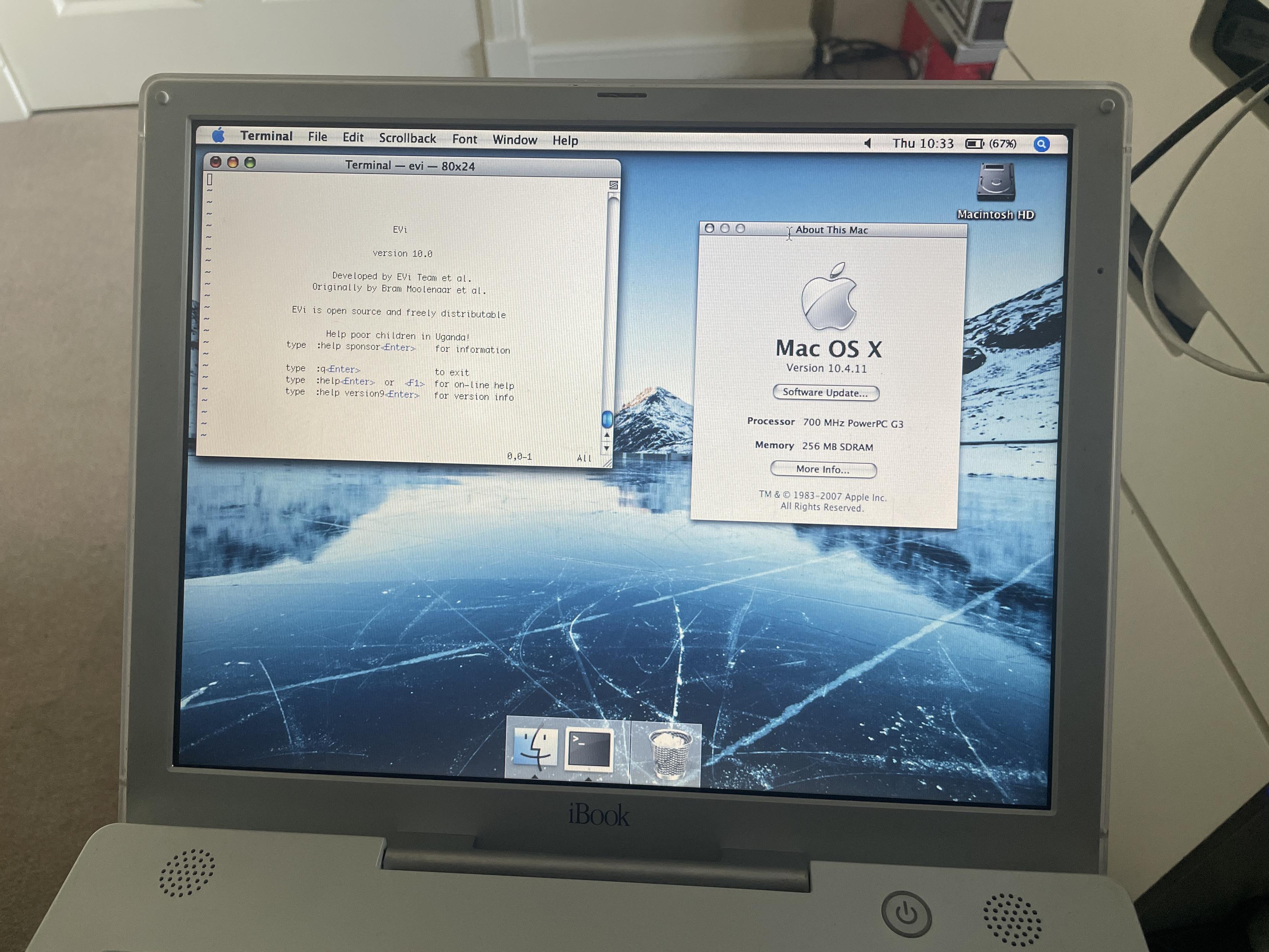
Alt...
My iBook G3 on Mac OS X 10.4.11 running the EVi editor.
New #blog #post: Vim Carnival Entry: "The Motion that Changed Everything."
https://rldane.space/vim-carnival-entry-the-motion-that-changed-everything.html
1224 words
cc: my wonderful #chorus: @joel @dm @sotolf @thedoctor @pixx @orbitalmartian @adamsdesk @krafter @roguefoam @clayton @giantspacesquid @Twizzay @stfn
(I will happily add/remove you from the chorus upon request! :)
Thanks to @hyde for the blog concept, and immediate apologies if you get trapped in a #hellthread! 😄
#rlDaneWriting #blost #vi #vim #nvi #editor #VimCarnival #TheMotionThatChangedEverything #modal #ADHD
![[?]](https://voidq.xyz/snac/hey/s/avatar-28daedd802e2db096d0a9d36c03c363e.png)
 [
[#Emacs have terminal based version but it's better on gui.
SOLUTION: @gumnos came up with the idea of piggy-backing :nohl onto control-l for refresh:
nmap <C-L> :nohl<CR><C-L
imap <C-L> <Esc>:nohl<CR><C-L>a
Hey #vim wizards,
The number one reason I don't use search more freely when editing is that all the highlights triggers my #CDO a little bit, and :nohl is a little clumsy to type in a hurry.
I wanted to map :nohl to an easy-to-press keybind, like ctrl-/, but I can't seem to get it to work.
Any ideas?
" map Ctrl-/ to :nohl
nmap <c-Slash> :nohl<CR>
imap <c-Slash> <Esc>:nohl<CR>a