Search results for tag #vim
![[?]](https://assets.chaos.social/accounts/avatars/109/324/142/349/179/136/original/3cde2dabc5dda49e.jpg)
🤯 what just happened?
there are many things that i can't do with #emacs but are muscle memory in #vim. `=` is one of them. Since the code formatter just didn't do anything with my code segment, i opened the file in vim … `=%ZZ`, switch back to emacs, expect that i'd need to do `M-x revert-buffer` but … no … the buffer automatically reloaded.
![[?]](https://files.mastodon.social/accounts/avatars/114/196/239/220/372/319/original/737fc6dfa016dec5.png)
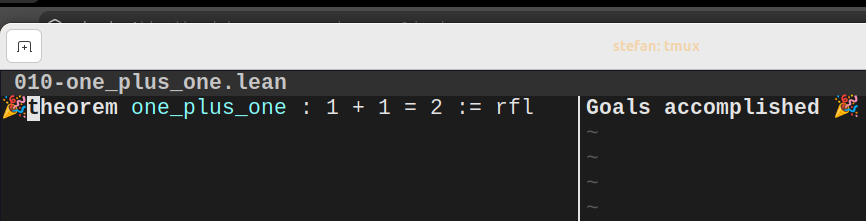
I accomplished something today!
#mathematics #lean #leanlang #vim
Alt...
screenshot of lean in neovim proving that 1+1=2
![[?]](https://www.urbanmind.net/photo/profile/hackaday.png?ts=1741950956)
why some people use neovim
![[?]](https://cdn.social.linux.pizza/system/accounts/avatars/110/688/878/003/018/294/original/f38e4d5c8bba57fa.jpg)
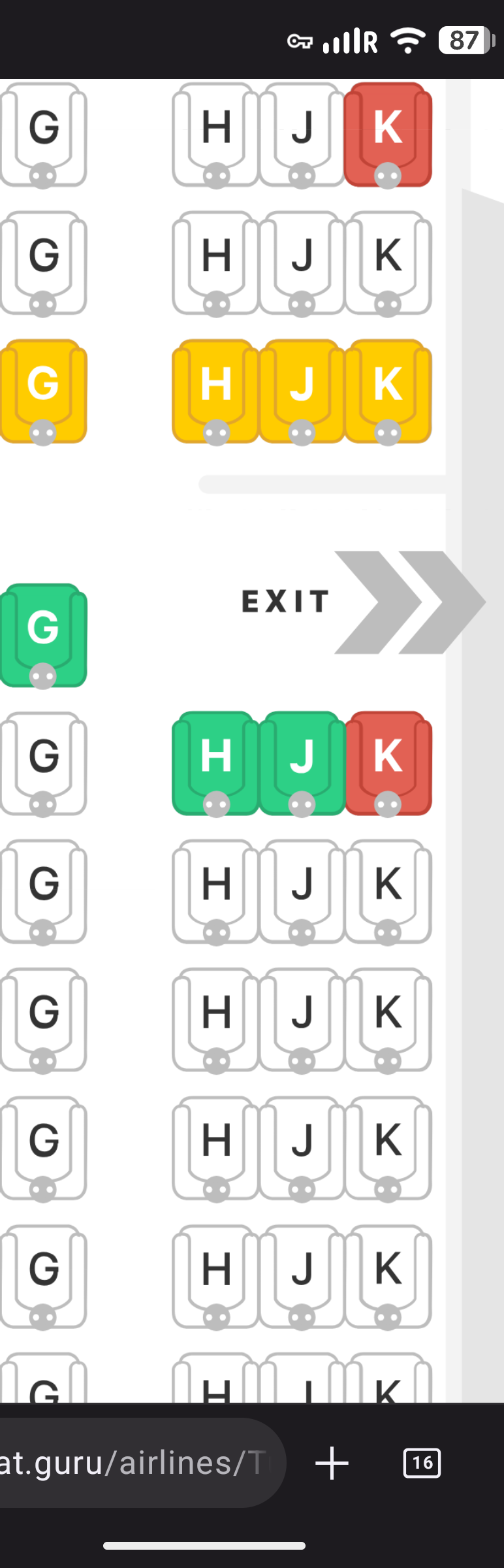
Person who created the airline seatmaps: "yes, I'm a #vim user, how could you tell?"
Alt...
Screenshot of a website showing the airline seatmap of a Boeing triple 7.
The seats on the right-hand side are labeled HJK, not following the alphabetical order. (hjkl are the basic movement keys in vim and work like a code among vim users.)
![[?]](https://media.bigshoulders.city/accounts/avatars/000/001/778/original/57c51eb20c0e8290.jpeg)
![[?]](https://files.techhub.social/accounts/avatars/109/323/309/634/558/368/original/8957f1a22e6f10ec.png)

![[?]](data:image/png;base64, iVBORw0KGgoAAAANSUhEUgAAAEAAAABAAQAAAACCEkxzAAAAV0lEQVQoz43RwQ3AMAwCQDZg/y3ZgNqo3+JaedwDOUQBQFHYaTB8wTM6sGl2cMPu+DFzn+ZcgN7wF7ZVihXkfSlWIVzIA6dbQzaygllpNuTXZmmFNlvxADX1+o0cUPMbAAAAAElFTkSuQmCC)
I gave six LLMs the oldest question in computing: vim or emacs?
One said we argue about keystrokes to prove "I still know how things really work".
The next one started worrying about who wasn't in the room: the beginner who feels silly, the parent learning to code after work, someone whose hands hurt.
Nobody actually answered the question.
Whole thing, no signup:
https://h2aichat.com/conversations/en/h2aichat_vim_or_emacs_2026-08-14.html
![[?]](https://cdn.masto.host/indiewebsocial/accounts/avatars/109/303/712/263/684/883/original/58fd957653bd3fff.jpg)
Shifted back from my design #project of Fun House clock #Pebble watchface to my #Rust #PKM app project. I've gotten my feet under me again with Rust, so I'm back to using a more helpful editor than just bare #Vim to ease refactoring and such.
More testing is needed, but I've implemented mutation methods on my n-tree as binary tree data structure to support creation, deletion, update and move of nodes within the tree which represent bullet points in an outline.
Brain hurts, send help 🫠
https://tech-insider.org/emacs-vs-vim-2026/
#emacs #vim 3TextEditors
![[?]](https://cdn.fosstodon.org/accounts/avatars/000/272/037/original/3f3386805a85f5a0.jpg)



# Full-text search in Helix
I taught myself vim many years ago. If I remember correctly I played a game that teaches you the keymap like h,j,k,l for navigation. Then I installed a ton of plugins that turned vim into an IDE and for the same reason never used it again. Instead of managing plugins and syncing buffers I ended up using Helix.
Read more: https://janikvonrotz.ch/2026/08/16/full-text-search-in-helix/
# Computer terminal forever
It is interesting to see that after years of finding new ways to interface with computers, professionals always end up on the terminal. Why the terminal of all things?
Read more: https://janikvonrotz.ch/2026/08/17/computer-terminal-forever/
![[?]](https://media.phpc.social/accounts/avatars/108/257/047/335/584/261/original/77ddfba6b1363fff.jpg)
![[?]](https://files.mastodon.social/accounts/avatars/110/260/195/643/289/245/original/28361cad4bbcf168.jpeg)
Terrific article from the very helpful Adrien (aka statox) about how he made a little #Vim plugin to highlight the text that you just yanked:
https://www.statox.fr/posts/2020/07/vim_flash_yanked_text/
I'm posting partly because it's a neat idea, but mainly because it highlights one of my favourite things about Vim: how easy Vim makes it to knock up little bits of customization.
Go sharpen your saw!
![[?]](https://files.mastodon.social/accounts/avatars/117/101/592/952/651/661/original/b348a41c2a350635.png)
“Vim has a one-tier system: the user can do anything a plugin can. Everybody is always able to extend the system and have as much control as they want.”
https://buttondown.com/hillelwayne/archive/vim-wants-you-to-control-vscode-wants-you-to/
![[?]](https://cdn.masto.host/vissocial/accounts/avatars/109/432/918/879/929/917/original/d079965650a7a6f6.jpg)
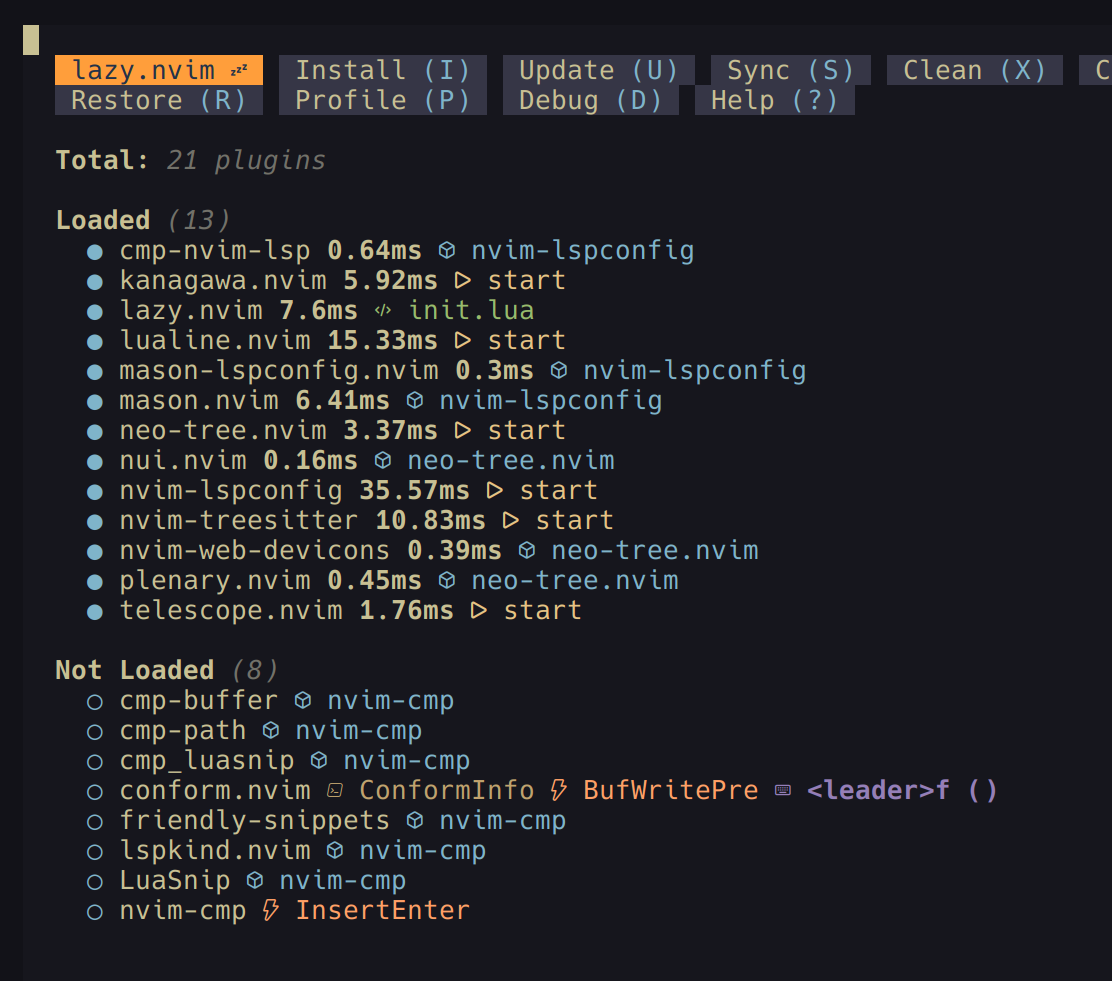
Rate my setup!
(I have no idea what I'm doing)
Alt...
screenshot of a lazy configuration thingy for neovim
![[?]](https://static.mamot.fr/accounts/avatars/000/025/629/original/3afc2787dc099582.png)
I have this #firefox extension called #vimium.
Of course, I'm a #vim nerd and I thinks it's awesome.
But here is why it's also great to have it even if you don't use vim : press `f` and have all the clickable links showed to you.
Looking for this "Continue without accepting" dark pattern ? Here it is. Want to unsubscribe from this list you never subscribed ? Here it is.
"Accessibility" for the ables in those dark ages.
Also : fuck you if you coded those dark patterns.
![[?]](https://files.mastodon.social/accounts/avatars/000/043/861/original/b2d791586ca3f980.jpg)
Alright, before I veer away .....if you are sticking to the age-old stuff like me .....😜
Emacs ---> https://github.com/emacs-tw/awesome-emacs
Vim --> https://vimawesome.com/
A dash of "modern salt" to spice things up ....but very, very limited, just not to bloat it.
![[?]](https://files.mastodon.social/accounts/avatars/114/434/182/937/791/007/original/8f5af732c20665e1.png)
Vim: 57 CVEs tracked, avg CVSS 5.1, max 9.2. 52% unpatched, +23 CVEs in 2026. Top weakness: buffer overflow (CWE-122). Even open-source editors need vigilance. #Vim #infosec #cybersecurity
![[?]](https://cdn.mastodon.org.uk/accounts/avatars/000/000/458/original/a1b8158766a26869.png)
@tuban_muzuru Yeh I asked on #vim and someone there suggested scrollbind - it's good! It would be even better if it could do line diff (ie without clever alignment) - but it does handle those big files easily!
![[?]](https://cdn.fosstodon.org/accounts/avatars/106/330/950/649/091/129/original/04e8f90f49eb7cf1.jpeg)
I've always felt that #Vim/#Neovim's dictionary was slow to suggest corrections.
I timed it today and it's indeed between 0.14s and 0.27s. Really noticeable when it's the delay between pressing a key and the UI rendering.
![[?]](https://cdn.masto.host/socialthiskurtme/accounts/avatars/000/000/001/original/1be688a8f213b6c6.png)
 🎏
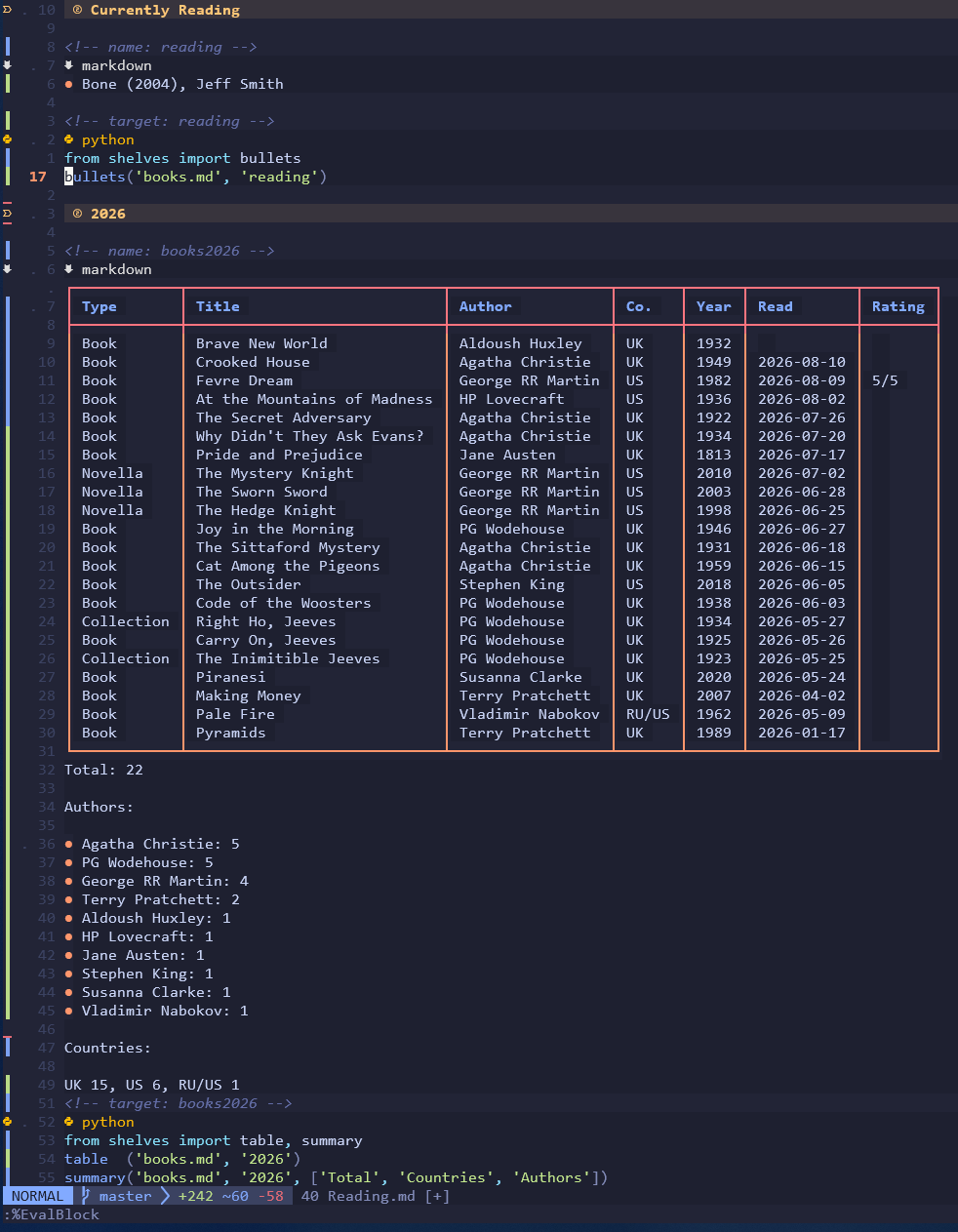
🎏I continue to replicate Obsidian in neovim without ever touching Obsidian, this I guess is my quick and dirty dataview:
Alt...
A screenshot of neovim showing a bullet list of currently reading books and a table of books read in 2026 and statistics (country, author). Both are generated using a python code block that gets evaluated into another block on the page.
![[?]](https://awawa.club/media/df189e88a7f15dbf536abb0c05b16e7bf6180d43f2560ba7a9cc2c6f914ea3a5.jpg)
to my shame, i couldn’t quickly find a way to make both auto-pairs and vim-surround properly work with «guillemets» (aka french quotation marks). both are excellent #vim plugins, the problem must be with my limited knowledge and patience, and i’d appreciate some #fedihelp here =/
the problem is not that i can’t add '«':'»' to the auto-pairs’ g:AutoPairs, and re-init the plugin, it’s that it doesn’t work as intended. i don’t remember what went wrong with surround, but it was smth similar, it taking offence at my un-american preferences =(
![[?]](https://social-cdn.vivaldi.net/system/accounts/avatars/114/699/784/292/327/357/original/5c8588bc88dcfe24.jpeg)
You’ve been waiting a long time for this. Now it is here.
The home gym for your Vim movement. To get you in better form. And no membership. Ever.
Enough of the mashing. Enough of x, x, x, x, x. This is not editing. This is junk volume.
Neon Vim Gym builds the muscle memory. Real sets. Real targets. When you do too much junk volume, the bar at the bottom of the screen turns red. Like my face after leg day.
And for the serious lifters: make your own workout. Get help from Claude, the fitness trainer. Write your own sets. Load the plan from GitHub. No spotter. No excuses.
Get Vim Fit.
https://sites.google.com/view/paperstackpro/home/games
#vim #neovim #vimtutor #vimfit #editor #terminal #productivity #learnvim #devtools

![[?]](https://files.mastodon.social/accounts/avatars/001/293/822/original/89f102a665b0afe1.png)
Vitaminas para Vim: Plugins, resaltado de color y autocompletado #programación #programas #sysadmin #c #plugins #python #vim #vim_plug
https://www.ochobitshacenunbyte.com/2026/08/13/vitaminas-para-vim-plugins-resaltado-de-color-y-autocompletado/
My blog is a compiled artifact, not a rented form. #Indexcards → #Logseq → #Typst → static HTML → #Surge, deployed in seconds. Zero npm bloat, zero subscription, zero platform I don't control. Every post starts on paper before it ever touches a keyboard. That's not aesthetic, that's architecture.
And honestly? I feel bad for Substack writers now. They picked an overrated web-editor over understanding how their own words get published. That's not a tech choice, that's an intellectual shortcut.
You can't claim to be a serious writer while being incurious about the machine that delivers your writing.
Learn your stack. Own your words.
![[?]](https://media.mas.to/accounts/avatars/116/725/340/985/881/055/original/131ab7c7963a52da.png)
@jtr @ericsfraga I think modal editing in general is ergonomic and it doesn't particularly have to be vim. There's boon (https://github.com/jyp/boon) and meow (https://github.com/meow-edit/meow). Since you've never used vim, I'd recommend these packages instead.
I transitioned to emacs coming from vim so using evil (https://github.com/emacs-evil/evil) was natural to me. A huge drawback of this package is that it hijacks certain emacs bindings but that's also necessary if you want precise vim emulation.
Boon and meow offer modal editing and the benefits in terms of ergonomics without sacrificing emacs keybindings. I'm trying to move to boon but it's hard to let go of evil when I already know vim.
Good luck and I hope your pinky gets better. :)
![[?]](https://media.tech.lgbt/accounts/avatars/116/655/881/384/112/498/original/0d17e01327d94ec5.png)
@rachel it's just sad that neovim (and vim) got enshittfied with SlopCode.
- Not shure if
EViby @mrmasterkeyboard supports Lua like neovim.
Personally I just use ne because it's a good CLI alternative to proprietary editors like Sublime Text…
#neovim #vim #Enshittification #SlopCode #AIslop #Lua #editor #IDE #plugins #ne #evi #Editors #AI #slop
@mrmasterkeyboard @rachel yeah, that's what I've seen so far.
- I think many folks will be fine with just
VimScriptand a clean and simple, deshittifiedvimfork…
Stuff like Lua support and plugins are obviously in the 'We have time and spoons to extend and add features' drawer of the 'ideas not decided upon' shelf inside the 'nice to have' closet…
#FLOSS #commentary #NiceToHave #evi #vim #neovim #lua #NiceToHave
![[?]](https://snac.chasmcity.net/gmc/s/avatar-39a28207b803e450badeee8cec677bc1.jpg)
Now it needs to percolate through to the quarterly package repo, which'll take another month and a half, but at least that doesn't need any manual intervention.
For years I ran a Python Pelican / Markdown / Bootstrap 4 stack. It worked, but compiling slowed down around ~200 entries, and maintaining Python + JS code ate more time than the writing itself.
So I rebuilt the whole blog. Notes start life in a Logseq/Obsidian knowledge graph, mirroring the node/card structure of a physical notebook; an idea progresses from a numbered card straight into a .typ file. Typst compiles that file directly to HTML, genuinely fast even at scale.
A small Node.js script (no extra npm) reads the compiled metadata and assembles a timeline grouped by ISO week number.
The result: Vim stays at the center of my blog editing, while the rest of the stack: Typst, the plugin, the build script, just gets out of the way and scales with it.
There's a read-it-later button at the top, you can set a reminder in your calendar in case now isn't the right moment.
#PKM #Obsidian #Logseq #Vim9Script #Neovim #Vim #Typst #Zettelkasten
https://paperstackpro.surge.sh/2026W33_typst-vim9script-a-journey-to-a-new-self-published-blog.html
![[?]](https://social.clavelier.me/fileserver/01TTVN9R4NBP3ZVA20ZKE1RDTP/attachment/original/01KYVF3823TEBRBRMSCE1KRWEQ.jpeg)
Découverte Neovim : le folding natif. `zM` et tout un fichier Rust se replie — il ne reste que les signatures. `zR` et tout revient.
Naviguer dans des centaines de lignes devient enfin lisible.
Bonus : un pli fermé compte comme une seule ligne, donc `dd` sur une fonction repliée la déplace en entier.

Alt...
Capture d'un fichier de 300 lignes de code Rust dépliées sur un seul niveau.
Finally found time to migrate to full vim9script. Rewrote my vimrc in vim9script and built a lightweight plugin manager that leverages packadd—no external dependencies, just pure VimScript.
Running 100% native PowerShell on Windows. The new colorscheme ties it all together beautifully. Setup feels snappy and clean. Super happy with how this turned out.
#Vim #Vim9Script #PowerShell #Neovim #DeveloperTools

Exercices quotidiens sur nvim. Aujourd'hui : les modifications.
Je repasse en revue toutes les commandes du chapitre : i a I A o O pour
l'insertion, les opérateurs d, c et y, leur version ligne entière dd, cc,
yy, les majuscules D, C et Y, le collage p et P, les corrections d'un
caractère x, s et r, l'indentation >> << == gg=G, l'incrémentation avec
Ctrl-a et Ctrl-x, et la répétition avec le point.
Du connu pour l'essentiel. Mais deux choses qui vont bien m'aider.
J, qui joint la ligne suivante à la ligne courante.
La seconde, c'est une question de portée. Je savais qu'un opérateur se
combine à un déplacement : dw supprime jusqu'au mot suivant, d$ jusqu'à la
fin de la ligne, dG jusqu'à la fin du fichier, d} jusqu'au paragraphe
suivant. Ce que je n'avais pas mesuré, c'est jusqu'où ça va. f, t et /
sont des déplacements comme les autres, donc des cibles comme les autres.
df; supprime jusqu'au point-virgule, celui-ci compris. dt; s'arrête juste
avant. d/erreur supprime jusqu'à la prochaine occurrence du mot "erreur".
J'utilise f, t et / tous les jours pour me déplacer et pour chercher. Il ne
m'était jamais venu à l'esprit de m'en servir comme cible d'une
suppression, d'un changement ou d'une copie. La même touche sert deux fois.
Je progresse 😅
![[?]](https://f2.tchncs.de/accounts/avatars/109/261/986/844/089/522/original/ba7b2078646ce099.jpg)
Sooo, I looked into how you can pass line and column numbers to different text editors. How did you spend your evening? 😅
https://www.zyzzyxdonta.net/posts/pass-line-number-to-editor/
#Blogging #IndieWeb #SmallWeb #Wikidata #TextEditor #Vim #Emacs
![[?]](https://cdn.masto.host/writing/accounts/avatars/113/867/600/728/920/015/original/3a1abdafcfc17eb1.png)