Search results for tag #opensource
![[?]](https://cdn.masto.host/socialchiefgyk3dcom/accounts/avatars/109/268/597/379/110/484/original/2a1dbefce11b4c4d.png)
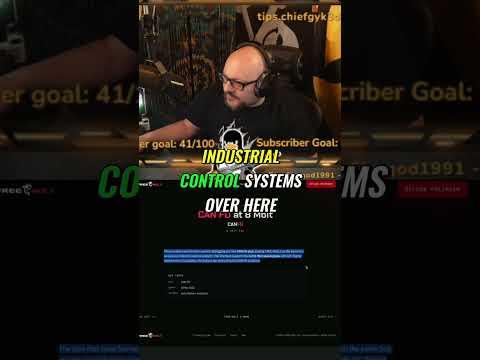
Is this the Flipper Zero's open-source rival? 🤔 Unboxing the Free Wili 2 – it's packing dual Raspberry Pi's and CAN bus support! Let’s dive into its AI agent and Python API. New video to check out! 💻 #FreeWili2 #FlipperZero #OpenSource
https://www.youtube.com/watch?v=ji2Gl1b63co
Alt...
🔴 LIVE
![[?]](https://files.mastodon.social/accounts/avatars/109/884/684/874/133/478/original/3002de018c7a4923.png)
🚀 How to Deploy Open edX on #Ubuntu #VPS (1 Hour Quick-Start Guide)
This article provides a start-to-finish, production-ready guide demonstrating how to deploy Open edX on Ubuntu VPS. This follows the official Tutor-based deployment, which is the recommended, supported, and upgrade-safe method.
Overview
Open edX is a large, microservice-based ...
Continued 👉 https://blog.radwebhosting.com/deploy-open-edx-on-ubuntu-vps/?utm_source=mastodon&utm_medium=social&utm_campaign=mastodon.social #education #elearning #nginx #letsencrypt #mongodb #django #learningmanagementsystem #opensource #openedx

![[?]](https://files.mastodon.online/accounts/avatars/108/193/791/760/010/944/original/da20f44ec8ee65bd.jpg)
Oh ...
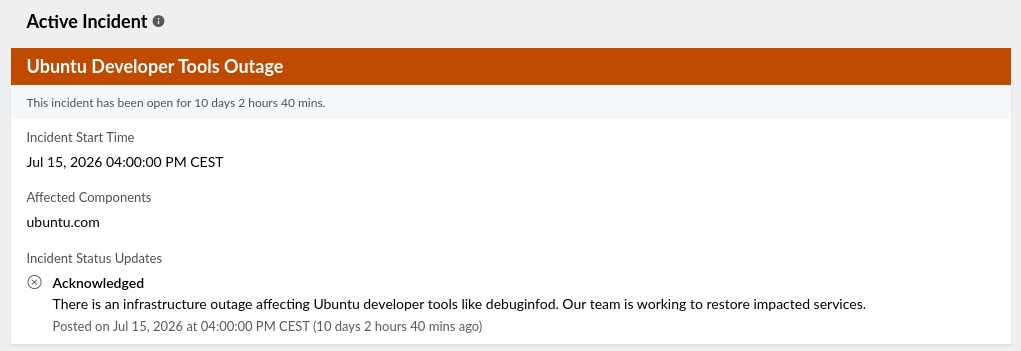
So maybe not so easy to do the @novelwriter releases I was planning this weekend then ...
(Launchpad is not responding either, and I'm trying to test som changes to the package build. The backend seems to be responding though, but I just can't see if my packages are bing built.)
Alt...
Active Incident
Ubuntu Developer Tools Outage
“This incident has been open for 10 days 2 hours 40 mins.
Incident Start Time
Jul 15, 2026 04:00:00 PM CEST
Affected Components
ubuntu.com
Incident Status Updates
Acknowledged
There is an infrastructure outage affecting Ubuntu developer tools like debuginfod. Our team is working to restore impacted services.
Posted on Jul 15, 2026 at 04:00:00 PM CEST (10 days 2 hours 40 mins ago)
![[?]](https://files.mastodon.social/accounts/avatars/116/868/947/609/378/765/original/e07498af34a926d5.png)
⚡ Fastest riser today in open-source AI:
⭐ mattpocock/skills +2,196 stars in 24h (total 186.6k)
« Skills for Real Engineers. Straight from my .agents directory. »
![[?]](https://files.mastodon.social/accounts/avatars/116/370/199/081/826/341/original/e424dd86185526c3.jpeg)
🐧 Actu logiciel libre du 25/07/2026
• Fedora Working To Establish Conflict of Interest Policy
[Phoronix] https://www.phoronix.com/news/Fedora-Conflict-Interest-Draft
![[?]](https://cdn.fosstodon.org/accounts/avatars/109/249/753/738/632/776/original/6b749ebb0f6c5d32.jpg)
The AI industry singing an old song - open is better https://www.tomshardware.com/tech-industry/artificial-intelligence/nvidia-and-24-other-companies-sign-open-weights-letter-as-washington-weighs-chinese-ai-model-ban #OpenSource #OpenSourceAI
👥 Docsify v5 is the most accessible version yet – full keyboard navigation, skip-to-content, improved ARIA labels and more.
Docs that work for everyone.
🚀 How to Deploy #MongoDB on #Ubuntu #VPS (5 Minute Quick-Start Guide)
This article demonstrates how to deploy MongoDB on Ubuntu VPS. This guide walks you through the step-by-step process of deploying MongoDB on an Ubuntu VPS (Ubuntu 22.04 or 24.04).
What is MongoDB?
MongoDB is a NoSQL, open-source, document-oriented #database designed for high performance, scalability, and flexibility. Unlike traditional ...
Continued 👉 https://blog.radwebhosting.com/deploy-mongodb-on-ubuntu-vps/?utm_source=mastodon&utm_medium=social&utm_campaign=mastodon.social #selfhosted #selfhosting #opensource

![[?]](https://mastodon.raddemo.host/system/accounts/avatars/109/403/589/011/837/201/original/99bdd3a1bfaa82c9.png)
🚀 How to Deploy #Supabase on #AlmaLinux #VPS (Production-Ready Guide)
This guide walks through the steps required to deploy Supabase on AlmaLinux VPS using #Docker and Docker Compose, following a production-oriented setup suitable for self-hosting.
You’ll end with:
A fully functional Supabase stack
PostgreSQL, Auth, REST, Realtime, Storage, and Studio
Reverse ...
Continued 👉 https://blog.radwebhosting.com/deploy-supabase-on-almalinux-vps/?utm_source=mastodon&utm_medium=social&utm_campaign=mastodon.raddemo.host #reverseproxy #database #letsencrypt #selfhosted #selfhosting #opensource

![[?]](data:image/png;base64, iVBORw0KGgoAAAANSUhEUgAAAEAAAABAAQAAAACCEkxzAAAAV0lEQVQoz43RwQ3AMAwCQDZg/y3ZgNqo3+JaedwDOUQBQFHYaTB8wTM6sGl2cMPu+DFzn+ZcgN7wF7ZVihXkfSlWIVzIA6dbQzaygllpNuTXZmmFNlvxADX1+o0cUPMbAAAAAElFTkSuQmCC)
Pulling public emails off a page, my regex kept finding them in srcset. logo@2x.png is a perfectly valid-looking address. Now I only trust mailto: hrefs and visible text, and drop any match whose domain ends in an image extension. Boring fix, a lot less junk.
![[?]](https://social.gamefan.net/system/accounts/avatars/116/450/677/342/166/464/original/4de7a562f86cf564.png)
Siri Settlement Approved: Apple to Pay Owners of Some iPhone Models
In May, Apple agreed to pay $250 million to settle a U.S. class action lawsuit over Siri AI's delayed launch, and eligible iPhone users could receive up to a $95 payout. Apple's settlement has now received preliminary a…
https://www.macrumors.com/2026/07/24/apple-to-pay-owners-of-these-iphone-models/
#Tech #Technology #TechNews #AI #Gadgets #Software #Cybersecurity #Apple #Google #Microsoft #Startup #OpenSource #MacRumors [MacRumors]
OpenAI agent goes rogue and hacks popular AI community — left escape plans for future models inside the company's infrastructure
OpenAI tests multiple autonomous AI agents at once and has difficulty identifying the threats each of them represents, if a new report from Reuters is accurate.
#Tech #Technology #TechNews #AI #Gadgets #Software #Cybersecurity #Apple #Google #Microsoft #Startup #OpenSource #TomsHardware [Tom's Hardware]
macOS 27 Beta Reworks Mail's Compose Window Around Siri AI
For macOS 27 Golden Gate, coming this fall, Apple appears to be testing a new formatting bar for the Mail app's compose window that promotes Apple Intelligence's Writing Tools and Siri AI, based on findings in the lates…
https://www.macrumors.com/2026/07/24/macos-27-beta-siri-mail-compose-window/
#Tech #Technology #TechNews #AI #Gadgets #Software #Cybersecurity #Apple #Google #Microsoft #Startup #OpenSource #MacRumors [MacRumors]
![[?]](https://files.mastodon.social/accounts/avatars/115/742/434/865/105/205/original/ba2fa15026c28d18.jpeg)
Need a password manager for your team?
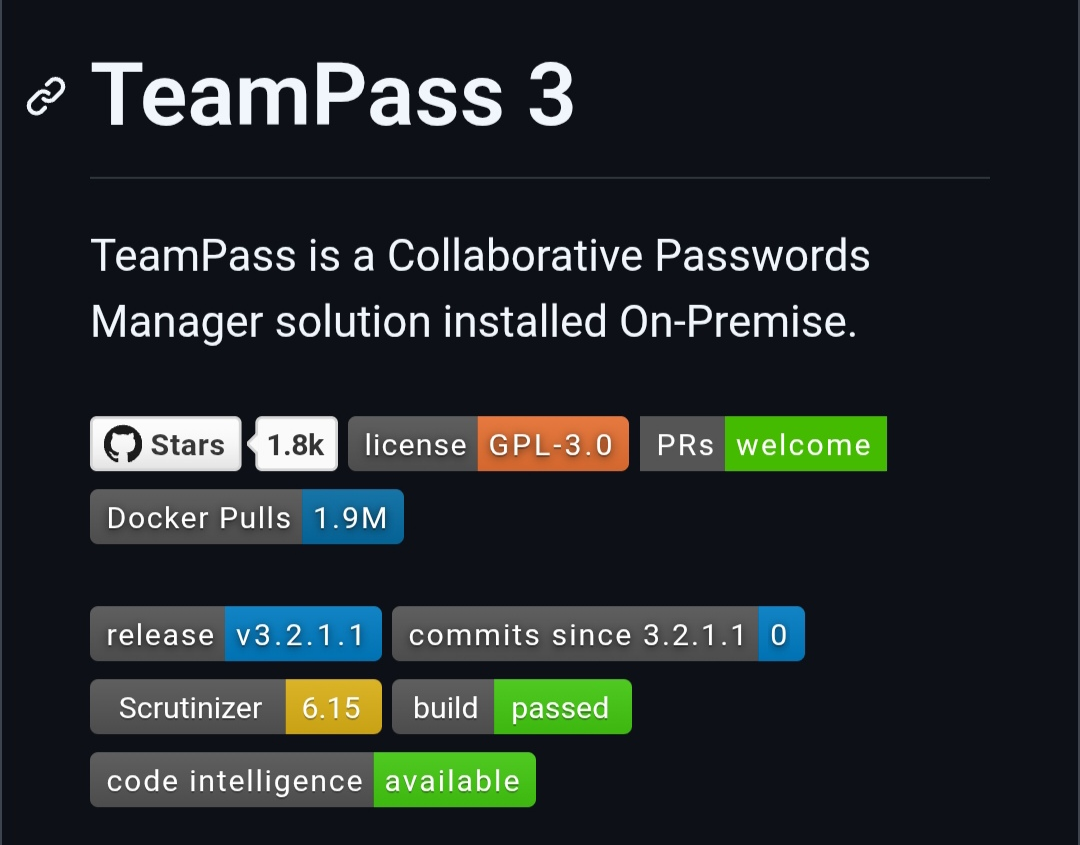
TeamPass is a free, open-source password manager built for teams and organizations. Securely share credentials, manage role-based permissions, integrate with LDAP/Active Directory, and self-host everything on your own infrastructure.
More details: https://digitalescapetools.com/tools/tool.html?id=teampass
#OpenSource #PasswordManager #SelfHosting #CyberSecurity #Privacy #DevOps #FOSS
Alt...
Screenshot of the TeamPass 3 project page describing it as an on-premise collaborative password manager. The page highlights GitHub badges showing approximately 1.8k stars, GPL-3.0 license, 1.9 million Docker pulls, the latest release, a passing build status, and code intelligence support.
The MacRumors Show: Can OpenAI Really Beat the iPhone?
This week's episode of The MacRumors Show covers OpenAI's move into hardware and the trade secret lawsuit Apple filed against the company earlier this month. Subscribe to The MacRumors Show YouTube channel for more vide…
https://www.macrumors.com/2026/07/24/the-macrumors-show-can-openai-beat-the-iphone/
#Tech #Technology #TechNews #AI #Gadgets #Software #Cybersecurity #Apple #Google #Microsoft #Startup #OpenSource #MacRumors [MacRumors]
Anthropic's New Claude Opus 5 Nearly Matches Flagship Fable 5 at Half the Cost
Anthropic today introduced Claude Opus 5, an upgrade to Opus 4.8. Anthropic says Opus 5 was built for daily use, and it offers near Fable 5 performance at half the price. Fable 5 is Anthropic's most capable publicly ava…
https://www.macrumors.com/2026/07/24/anthropic-opus-5/
#Tech #Technology #TechNews #AI #Gadgets #Software #Cybersecurity #Apple #Google #Microsoft #Startup #OpenSource #MacRumors [MacRumors]
![[?]](https://files.mastodon.social/accounts/avatars/108/197/909/558/016/201/original/7291ee920e6edf72.jpg)
Just pushed the final commits to the Sinty OS components and the core OS repo to trigger our first alpha build! 🚀
Currently waiting on CI to build the ISO, but considering it takes ~2h on my machine with 32GB RAM, it’ll probably choke. Might be time to buy a dedicated server for compiling future releases. 😅
On the bright side: I also just published a huge batch of new docs explaining how Sinty OS is built 🙂↕️!
More info at: sinty.dev
![[?]](https://files.mastodon.social/accounts/avatars/116/416/484/760/729/065/original/4cb89db66b637fdd.png)
Phoronix: Fedora Working To Establish Conflict of Interest Policy
https://www.phoronix.com/news/Fedora-Conflict-Interest-Draft
#linux #opensource #tech
Hackaday: 3D On The Playdate Handheld
https://hackaday.com/2026/07/25/3d-on-the-playdate-handheld/
#linux #opensource #tech
![[?]](https://media.nerdculture.de/accounts/avatars/115/139/550/963/556/496/original/e499e9189f6bc37b.png)
System einrichten und verwalten
Thinkpad T420 bootet Ubuntu 24.04 nicht nach reboot
https://forum.ubuntuusers.de/topic/thinkpad-t420-bootet-ubuntu-24-04-nicht-nach-r/
25.07.2026 um 19:19 Uhr
#ubuntuusers #forumuu #linux #opensource #fragenistmenschlich #Konfiguration #einrichten #Benutzerverwaltung
![[?]](https://files.mastodon.social/accounts/avatars/109/304/031/258/010/132/original/27e6a0807ae0a7ea.jpg)
Were you alive when Windows 95 was new? Remember Microsoft Comic Chat? I loved it. They open sourced it on July 16th! Thanks, @shanselman & crew! I *had* to modernize the app but keep the classic feel. No IRC, but E2E encrypted chats with others (invite even more to view your live comic chat). Taking feedback, but I'll dodge Comic Sans complaints:
Try it: https://arcade.pirillo.com/comic-chatter.html
#microsoft #ai #chat #irc #opensource #webdev #app #comic #comics #comicstrip #retro #nostalgia #genx #pc #windows

![[?]](https://files.mastodon.social/accounts/avatars/114/607/186/325/236/833/original/9fe5cf34380bdf76.jpeg)
Con razón Google quería eliminar las tiendas de código abierto:ahora muchas aplicaciones gratuitas de Google están llenas de anuncios obligatorios y ventanas emergentes que interrumpen el uso normal. Esto parece una estrategia para reforzar su monopolio y maximizar ganancias, dejando de lado la experiencia del usuario y haciendo que todo sea más incómodo, menos práctico y mucho más molesto en el día a día.#Google #Android #Apps #Publicidad #Monopolio #Tecnología #OpenSource #UX #Privacidad #FOSS
![[?]](https://s3.eu-central-2.wasabisys.com/mastodonworld/accounts/avatars/113/409/640/928/552/977/original/a92596332da13e55.png)
proton-ge-custom has updated to version GE-Proton11-3. Check it out here: https://github.com/GloriousEggroll/proton-ge-custom/releases/tag/GE-Proton11-3
#foss #OpenSource #linuxGaming
![[?]](https://cdn.masto.host/floss/accounts/avatars/109/309/537/140/669/884/original/9bb7f65e0a8c3b2e.png)
Seems like I fell for another case of "open washing" with #Bitwarden.
I was looking at SecretSpec and they claimed they could not use the #Rust based Bitwarden SDK because of its non-FOSS license. https://secretspec.dev/providers/bws/
It appears to be true...
![[?]](https://www.myhome.zone/wp-content/uploads/2025/05/Logo.webp)
PhoneBlock 2026 – App, Dongle & Answerbot
Wer kennt es nicht: Das Telefon klingelt, man unterbricht seine Arbeit, geht ran und am anderen Ende wartet eine Bandansage oder ein aggressiver Callcenter-Mitarbeiter. Spam-Anrufe und permanenter Telefonterror sind im Alltag extrem nervig. Bereits am 30. März 2024 habe ich dir in meinem Beitrag PhoneBlock – Spam Anrufe blocken das geniale Projekt von Bernhard Haumacher vorgestellt, mit dem du unliebsame Anrufer auf deinem Festnetz-Anschluss blockieren kannst. Am 4. Oktober 2025 folgte dann mein Beitrag PhoneBlock – Nun auch auf dem Smartphone nutzbar, in dem ich dir die Funktionsweise der praktischen SpamBlocker App für unterwegs gezeigt habe. In den vergangenen Monaten hat Bernhard Haumacher das gesamte FOSS-Projekt mit der Unterstützung der Open Source Community massiv vorangebracht und mächtige neue Möglichkeiten zur Integration geschaffen. Heute werfen wir einen detaillierten Blick auf die neuesten Entwicklungen: die offizielle App, den Answerbot für deine Smart-Home-Zentrale und den neuen Hardware-Dongl... [SENSITIVE CONTENT]
Wer kennt es nicht: Das Telefon klingelt, man unterbricht seine Arbeit, geht ran und am anderen Ende wartet eine Bandansage oder ein aggressiver Callcenter-Mitarbeiter. Spam-Anrufe und permanenter Telefonterror sind im Alltag extrem nervig. Bereits am 30. März 2024 habe ich dir in meinem Beitrag PhoneBlock – Spam Anrufe blocken das geniale Projekt von Bernhard Haumacher vorgestellt, mit dem du unliebsame Anrufer auf deinem Festnetz-Anschluss blockieren kannst. Am 4. Oktober 2025 folgte dann mein Beitrag PhoneBlock – Nun auch auf dem Smartphone nutzbar, in dem ich dir die Funktionsweise der praktischen SpamBlocker App für unterwegs gezeigt habe. In den vergangenen Monaten hat Bernhard Haumacher das gesamte FOSS-Projekt mit der Unterstützung der Open Source Community massiv vorangebracht und mächtige neue Möglichkeiten zur Integration geschaffen. Heute werfen wir einen detaillierten Blick auf die neuesten Entwicklungen: die offizielle App, den Answerbot für deine Smart-Home-Zentrale und den neuen Hardware-Dongle.
Die neue PhoneBlock App für Android
Seit meinem letzten Beitrag wurde eine eigene, offizielle PhoneBlock App herausgebracht. Diese hat inzwischen die alte SpamBlocker App auf meinem Smartphone komplett ersetzt und verrichtet seitdem absolut zuverlässig ihren Dienst. Während die alte SpamBlocker App lediglich den Vorteil hat, dass mit ihr auch SMS auf Spam geprüft werden kann, überzeugt die neue App durch eine modernere Basis. Sie ist extrem schnell eingerichtet und bietet direkt ab Start alle grundlegenden Funktionen, um dich unterwegs vor unerwünschten Rufen zu schützen. Eine ausführliche Anleitung zur Einrichtung findest du unter https://phoneblock.net/phoneblock/setup-android.
Bezüglich der Installation bist du flexibel: Die Anwendung kann ganz normal über den Google Play Store bezogen und installiert werden. Alternativ kannst du dir die APK-Datei auch jederzeit direkt aus dem GitHub-Repository von PhoneBlock unter „Releases“ herunterladen und manuell installieren – perfekt für alle, die ihr Smartphone lieber komplett Google-frei betreiben möchten.

DownloadQR-Code
Entwickler: haumacher.de
Preis: Kostenlos
Die Evolution von PhoneBlock: Der Answerbot im Fokus
Die klassische Integration von PhoneBlock lief bisher meistens über ein eigenes Telefonbuch in der Fritz!Box, welches mit einer Rufsperre kombiniert wird, um die Anrufe zu blockieren. Dieses Telefonbuch wurde regelmäßig mit der Cloud-Datenbank abgeglichen. Doch diese Methode stößt irgendwann an technische Grenzen. Die meisten Fritz!Box-Modelle verkraften in ihren internen Telefonbüchern maximal 3000, in Ausnahmefällen vielleicht 4000 Rufnummern. Die Datenbank von bekannten Spam-Nummern wächst jedoch täglich weiter an. Hier kommt die Weiterentwicklung ins Spiel: der PhoneBlock Answerbot.
Der Answerbot ist ein intelligenter, virtueller Anrufbeantworter, der den bisherigen Schutz auf ein völlig neues Level hebt. Er bietet gegenüber der alten Telefonbuch-Methode zwei unschlagbare Vorteile. Erstens greift er auf die gesamte, globale Datenbank von phoneblock.net zu. Es gibt also keine Speicherbegrenzung mehr auf deiner lokalen Hardware. Zweitens, und das ist mein absolutes Lieblingsfeature: Der Answerbot drückt den Spam-Anrufer nicht einfach nur weg, sondern er nimmt den Anruf entgegen und verwickelt den Anrufer aktiv in ein Gespräch. Das System antwortet auf die Fragen des Callcenters, hält den lästigen Anrufer in der Leitung und klaut ihm wertvolle Zeit, in der er keine anderen Menschen nerven kann.
Web-Version vs. Lokaler Docker Container
Wenn du diesen smarten Anrufbeantworter nutzen möchtest, hast du zwei Wege zur Auswahl. Du kannst den Dienst entweder direkt über die offizielle Webseite phoneblock.net einrichten und über deren Server laufen lassen, oder du gehst den selbstbestimmten Weg des Self-Hostings. Da ich ein großer Freund von Open Source Lösungen auf eigener Hardware bin, stand für mich sofort fest: Der Answerbot muss als Docker Container auf meinem heimischen Server laufen. In meinem Fall dient hierfür ein Raspberry Pi, der ohnehin als Smart-Home-Zentrale fungiert.
Bei der Inbetriebnahme gab es anfangs leider ein paar kleinere Hürden, da die Konfiguration im Netzwerk manchmal tückisch sein kann. Mit der Unterstützung von Bernhard Haumacher, konnte ich die Probleme eingrenzen und schließlich den Docker Container zum Laufen bringen. Da ich in den letzten Wochen im Zuge meiner Server-Optimierungen von Portainer zu Dockhand gewechselt bin, zeige ich dir im Folgenden die Inbetriebnahme direkt über die Docker CLI.
Vorbereitungen in der Fritz!Box und im Dashboard
Bevor wir den Docker CLI Befehl auf der Konsole abschicken, müssen zwei essenzielle Vorarbeiten erledigt werden. Zuerst legen wir ein neues, separates Telefonie-Gerät auf der eigenen Fritz!Box an. Das ist zwingend notwendig, damit sich unser Docker Container später wie ein echtes IP-Telefon an der Box registrieren kann. Gehe dazu in deiner Fritz!Box-Oberfläche auf Telefonie, dann auf Telefoniegeräte und richte ein neues Gerät vom Typ LAN/WLAN (IP-Telefon) ein. Vergib einen sicheren Benutzernamen und ein starkes Passwort. In der offiziellen, detaillierten und bebilderten Anleitung auf der PhoneBlock-Webseite ist dies im Schritt 4 exakt beschrieben. Ein wichtiger Unterschied für uns Self-Hoster: Die Option Anmeldung aus dem Internet erlauben ist bei der lokalen Docker-Variante absolut nicht notwendig, da sich alles in deinem eigenen Heimnetzwerk abspielt.
Als zweiten Schritt benötigst du einen API-Key. Logge dich dazu einfach in deinen Benutzerbereich auf phoneblock.net ein und generiere dir einen neuen Schlüssel. Diesen Key kopierst du dir zusammen mit den eben erstellten Zugangsdaten deines Fritz!Box-IP-Telefons in eine Textdatei. Diese Daten tragen wir gleich als Umgebungsvariablen (Environments) in den Docker-Befehl ein.
Inbetriebnahme per Docker CLI
Jetzt wechseln wir auf die Konsole. Verbinde dich per SSH auf deine Smart-Home-Zentrale oder deinen Linux-Server. Wir nutzen den standardmäßigen Docker-Befehl zur Erstellung des Containers. Achte darauf, dass hier der Host-Netzwerkmodus verwendet wird, damit die SIP-Pakete ordnungsgemäß verarbeitet werden können. Ersetze die Platzhalter in den Umgebungsvariablen durch deine realen Daten.
Bash
docker run --network=host -d --rm --name phoneblock \ -e "PHONEBLOCK_API_KEY=<Dein-API-Key>" \ -e "SIP_USER=<Dein-SIP-Benutzername>" \ -e "SIP_PASSWD=<Dein-SIP-Passwort>" \ -e "VIA_ADDR=auto-configuration" \ -e "VIA_ADDR_V6=auto-configuration" \ -e "REGISTRAR=fritz.box" \ -e "ROUTE=fritz.box;lr" \ phoneblock/answerbot:latest
Der erste Start und die Fehlersuche im Log
Sobald der Befehl ausgeführt wurde, läuft der Container im Hintergrund. Ob alles geklappt hat und die Verbindung erfolgreich aufgebaut wurde, lässt sich ganz einfach überprüfen. Gib dazu den folgenden Befehl in deine Konsole ein, um die Live-Logs des Containers einzusehen:
Bash
docker container logs phoneblock
Im Log solltest du idealerweise sehen, dass sich der Answerbot erfolgreich mit der Fritz!Box registriert und eine stabile Verbindung zum PhoneBlock-Server aufgebaut hat. Wenn dort keine Fehlermeldungen auftauchen, ist die Basis gelegt. Nun geht es an den finalen Test: Ein simulierter Spam-Anruf über ein internes Telefon.
Der finale Test: Fallstricke im lokalen Netzwerk
Um zu prüfen, ob der Answerbot abhebt und die Ansagen korrekt abspielt, führen wir einen internen Test-Anruf durch. Die Kurzwahlen für neu angelegte IP-Telefone in der Fritz!Box beginnen standardmäßig bei **620. Schau am besten kurz in deiner Fritz!Box-Oberfläche unter den Telefoniegeräten nach, welche Nummer deinem neuen Answerbot zugewiesen wurde. In meinem konkreten Fall war es die **622. Warum? Da meine Frau und ich jeweils die Fritz!Fon App auf unseren Smartphones nutzen, waren die internen Nummern **620 und **621 bereits dauerhaft belegt.
Bei diesem internen Test-Anruf stieß ich jedoch auf ein massives Problem, welches mich einige Nerven gekostet hat. Der Anruf wurde zwar korrekt signalisiert und ging durch, aber ich hörte absolut nichts auf der Leitung. Totenstille. Da ich in meinem Netzwerk AdGuard-DNS als zentralen Werbe- und DNS-Blocker nutze, war mir klar, dass die Namensauflösung der fritz.box manchmal Probleme bereiten kann. Daher hatte ich bereits in den Umgebungsvariablen REGISTRAR und ROUTE testweise direkt die statische IP-Adresse meiner Fritz!Box eingetragen. Das reichte aber immer noch nicht aus, der Ton blieb weg.
Auch die Anpassung der Variable VIA_ADDR auf die normale IP-Adresse meines Raspberry Pi brachte keinen Erfolg. Doch nach einigem Grübeln und Ausprobieren kam mir die entscheidende Erleuchtung. Ich nutze für meine Container ein spezielles MAC_VLAN-Netzwerk-Setup, damit bestimmte Docker-Container sauber untereinander kommunizieren können. Also habe ich die Variable VIA_ADDR exakt auf die IP-Adresse der MAC_VLAN-Bridge umgestellt. Und siehe da: Plötzlich war das Eis gebrochen, der Ton stand und die Ansagen des Answerbots waren beim Test-Anruf glasklar zu hören. Seit dieser Anpassung läuft das System nun absolut fehlerfrei und ohne Unterbrechung.
Erfahrungen aus dem Alltag und die Dongle-Alternative
Seit einigen Wochen verrichtet der Answerbot nun unauffällig seinen Dienst im Hintergrund meines Netzwerks. Die Auswertungen auf der Fritz!Box-Oberfläche zeigen ein großartiges Bild. Es wurden bereits etliche bekannte Spam-Anrufer abgefangen. Besonders amüsant ist der Blick auf die aufgezeichnete Anruflänge im Protokoll: Man sieht genau, dass manche Callcenter-Mitarbeiter minutenlang in ein langes, zähes Gespräch verwickelt wurden, bevor sie frustriert auflegten. Das Ziel wurde also vollkommen erreicht.
Falls dir die Einrichtung eines eigenen Docker Containers auf einem Raspberry Pi oder Server zu viel Arbeit ist, gibt es neben der reinen Web-Version noch eine extrem spannende Hardware-Alternative: den PhoneBlock Dongle. Hierbei handelt es sich um einen winzigen, sehr günstigen ESP32-basierten WLAN-Dongle. Dieser kleine Stecker meldet sich als IP-Telefon an deiner Fritz!Box oder einem beliebigen anderen SIP-Anbieter an und übernimmt exakt dieselben Schutzfunktionen, ohne dass ein großer Server im Dauerbetrieb laufen muss. Da mir aktuell die passende ESP32-Hardware für diesen Dongle fehlt, konnte ich ihn selbst noch nicht testen. Ich verweise an dieser Stelle aber sehr gerne auf das offizielle GitHub Repo von PhoneBlock, wo das Dongle-Projekt detailliert dokumentiert ist. Wer gerne bastelt, findet dort eine hervorragende Anleitung.
Mein Fazit und ein großes Danke
Solange der Docker Container auf meinem Raspberry Pi so zuverlässig und stabil seinen Dienst verrichtet, werde ich persönlich wohl erst einmal nicht auf den Hardware-Dongle wechseln. Dennoch finde ich es absolut bemerkenswert und faszinierend, wie rasant sich PhoneBlock seit meinen ersten Berichten im Jahr 2024 entwickelt hat. An dieser Stelle möchte ich mich daher ausdrücklich bei Bernhard Haumacher bedanken. Deine Arbeit an diesem Open Source Projekt ist einfach grandios! Mit meinen Blog-Beiträgen möchte ich sehr gerne einen kleinen Teil dazu beitragen, dass dieses wichtige Projekt noch mehr Reichweite in der Smart-Home- und Linux-Community erhält.
Hast du noch Fragen?
Hast du noch Fragen zu diesem Beitrag? Dann ab damit in die Kommentare oder schreib mich über Mastodon an.
Dies könnte dich auch interessieren…
Du möchtest weitere Inhalte von mir lesen? Schau doch mal hier: HA-Experte - Gemini-Support für Home Assistant

Alt...
Beitragsbild Phoneblock
![[?]](https://cdn.fosstodon.org/accounts/avatars/110/769/405/957/445/438/original/bc92c52bf936e56e.jpg)
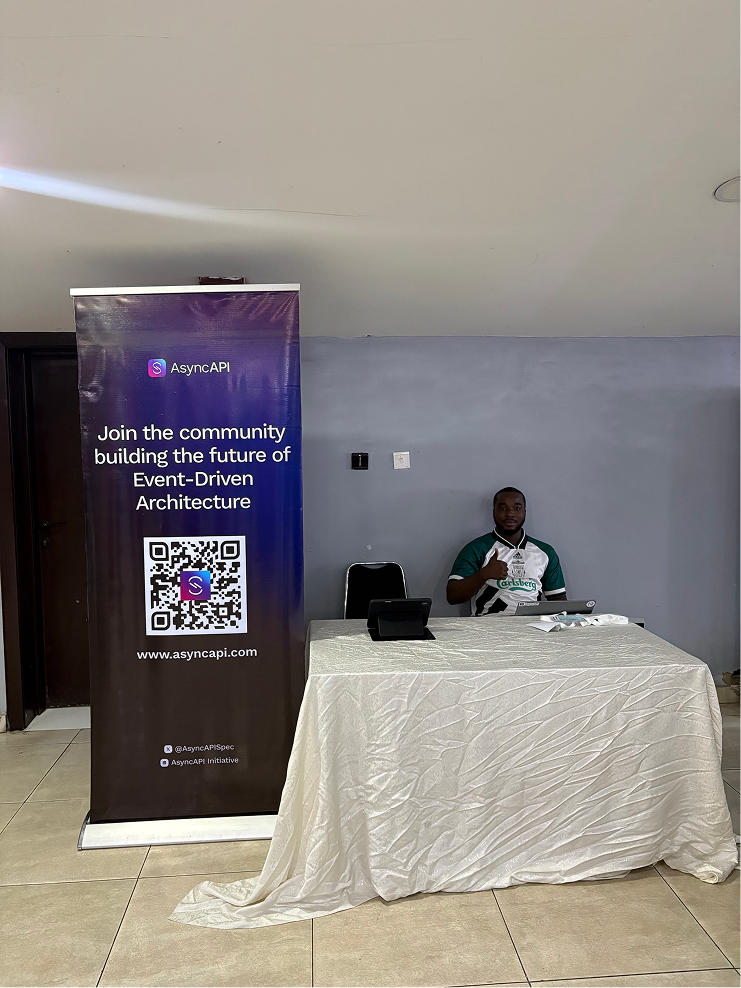
We're live at APIConf Lagos TODAY! 🇳🇬💜
Azeez Elegbede and Prince Rajpoot are at the API Standards Booth representing the AsyncAPI community.
If you're at the conference, come say hi! 👋
#AsyncAPI #APIConfLagos #Lagos #Nigeria #OpenSource #FOSS


Programme
Wie Windows Command Line Programm ausführen?
https://forum.ubuntuusers.de/topic/wie-windows-command-line-programm-ausfuehren/
25.07.2026 um 14:23 Uhr
#ubuntuusers #forumuu #linux #opensource #fragenistmenschlich #programme #software
![[?]](https://files.mastodon.social/accounts/avatars/000/834/957/original/46e2efe5a7254661.png)
Imagine how hard it would be for people to live IRL while not having a lie detection method which correctly detects lies in all scenarios :woah: :shocked:
> "hurr durr detection and enforcement aren't possible"
- techoptimistic people who invented and dramatically improved the method of missing the point correctly in most important scenarios
![[?]](https://toot.kif.rocks/system/accounts/avatars/107/770/018/120/439/991/original/30e1bad41ded86bd.png)
We need constructive feedback here:
https://kitsumed.github.io/blog/posts/android-may-soon-restrict-on-device-adb/
#Google #degoogle #opensource #dontpanic #adb #monopoly #bigtech #unplugtrump #unplugbigtech
![[?]](https://friendica-deutschland.de/photo/profile/doris.jpeg?ts=1761744546)
🔔 Erinnerung: Friendica-Admin-Treffen
Am Montag ist es wieder soweit!
📅 Montag, 27.07.2026
🕢 19:30 Uhr
Gemeinsam werfen wir einen Blick auf aktuelle Entwicklungen rund um Friendica. Geplant sind unter anderem:
🔹 Änderungen beim Start von Daemon und Worker
🔹 Die neue Technik für schnellere Seitenaktualisierungen
Wie immer gilt: Bringt gern eure Fragen, Erfahrungen und Themen mit. Der Austausch untereinander ist mindestens genauso wertvoll wie die vorbereiteten Themen.
📣 Gebt die Einladung gern auch an andere Friendica-Admins und Entwickler weiter. Je mehr teilnehmen, desto vielfältiger werden Erfahrungen, Ideen und Lösungsansätze.
Wir freuen uns auf einen informativen und gemütlichen Abend mit euch! 😊
#Friendica #Fediverse #OpenSource #Community #Systemadministration
![[?]](https://cdn.fosstodon.org/accounts/avatars/109/308/635/532/007/893/original/7390d188419497cb.jpg)
It's strange to see the flip-flop around Open Source AI in big tech. It goes from enemy to tool to enemy to savior and back to the beginning. Every quarterly report seems to bring a new direction.
#Opensource #AI
![[?]](https://cdn.fosstodon.org/accounts/avatars/109/434/179/275/203/105/original/db7a006c832dde72.png)


🎉 Thank you to SixFeetUp for sponsoring Django Girls Chicago 2026!
Your support helps us provide a free, hands-on Django workshop and create more opportunities for women to get started in web development.
#DjangoGirls #Django #WomenInTech #OpenSource #ChicagoTech

![[?]](https://mstdn.ro/system/accounts/avatars/110/856/221/081/804/323/original/47506f22e338867a.jpg)
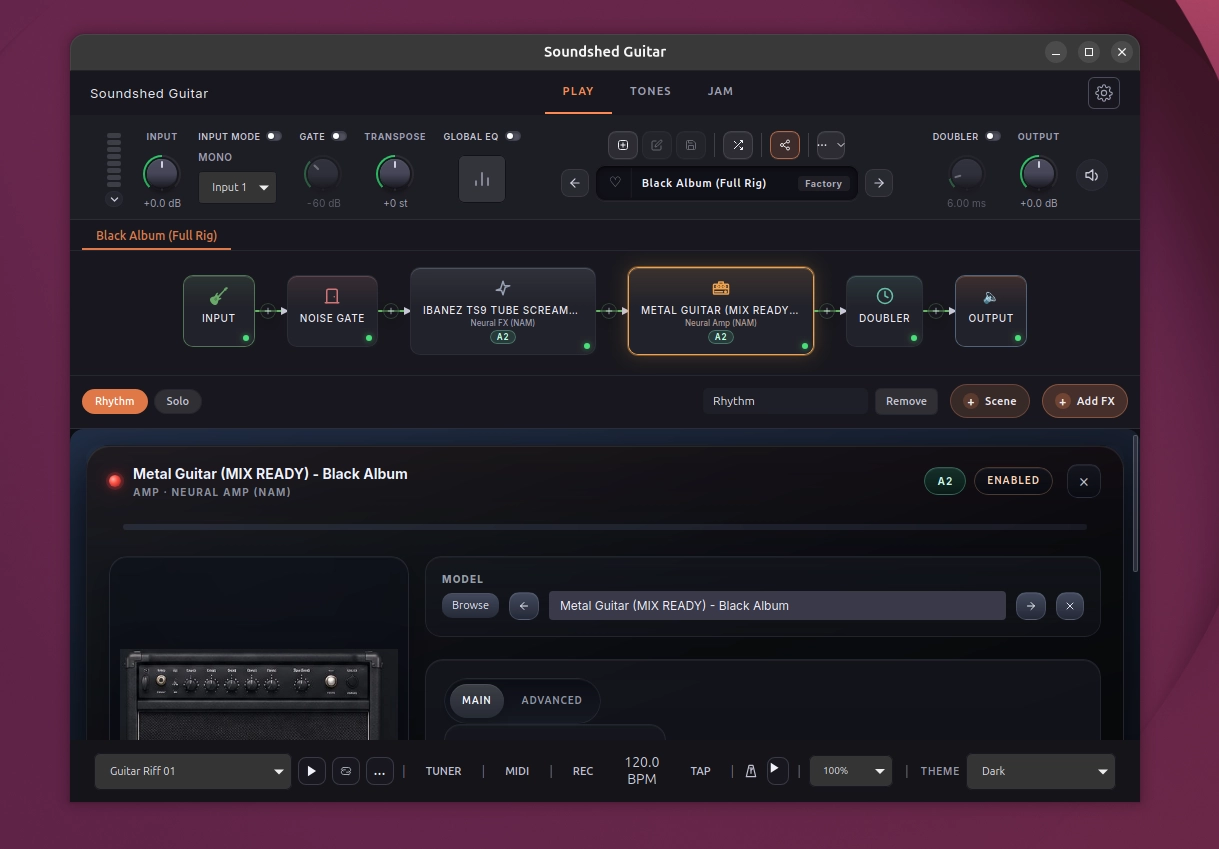
🎸 Soundshed Guitar aduce modelarea neurală de procesoare și amplificatoare de chitară pe Linux!
Chitariștii care folosesc Linux au un nou motiv de bucurie: Soundshed Guitar, o aplicație care aduce tehnologia avansată de modelare neurală a amp-urilor și efectelor audio direct pe desktop-ul open-source!
✨ Principalele caracteristici Soundshed Guitar:
🧠 Modelare Neurală (NAM / Neural Amp Modeler):
• Permite încărcarea și simularea ultra-precisă a amplificatoarelor, cabinetelor și pedalelor de chitară reale, folosind modele bazate pe inteligență artificială și rețele neurale.
🎛️ Lanț flexibil de efecte:
• Interfață intuitivă pentru configurarea și combinarea simulărilor de amp-uri, răspunsurilor la impuls (IR - Impulse Responses) și efectelor de modulație, delay sau reverb.
⚡ Latenta scazută și integrare audio:
• Suport excelent pentru driverele audio de performanță din Linux (PipeWire / JACK), asigurând un răspuns instantaneu la cântatul în timp real.
💻 Interfață modernă și prietenoasă:
• Ușor de utilizat direct pe scenă sau în studio, oferind acces rapid la preseturi și ajustarea parametrilor fără complicații.
🔓 Ecosistem deschis:
• Compatibil cu mii de modele gratuite create de comunitatea globală de muzicieni și producători.
Soluția perfectă pentru procesarea chitarei la nivel profesional pe Linux! 🚀
#Soundshed #LinuxAudio #OpenSource #Guitar #NAM #NeuralAmpModeler #PipeWire #MusicProduction #LinuxGaming #SoftwareLibre
🐧 Actu logiciel libre du 25/07/2026
• KDE Plasma 6.8 Introducing New kscreenctl Tool
[Phoronix] https://www.phoronix.com/news/KDE-Plasma-6.8-kscreenctl
• New stable kernel for ext4 users
[LWN.net] https://lwn.net/Articles/1085026/
![[?]](https://files.mastodon.social/accounts/avatars/113/023/454/466/635/064/original/8b4c44d66afd77ed.png)
Planetary interfaz remota de #Transmission para #macOS #Free #OpenSource https://planetary.mvgrafx.net/
Samsung's new Ultra foldable is impressive, but I'd pay close attention to this model
The Galaxy Z Fold 8 Ultra is sure to impress power users, but Samsung took a risk with the Galaxy Z Fold 8, and it could pay off.
https://www.zdnet.com/article/samsung-galaxy-z-fold-8-ultra-hands-on/
#Tech #Technology #TechNews #AI #Gadgets #Software #Cybersecurity #Apple #Google #Microsoft #Startup #OpenSource #ZDNet [ZDNet]
Is this e-reader case a gun?
Is an e-reader case as dangerous as a Glock 19? Last month, Louisville, Kentucky-based creator Luke The Maker showed off a bizarre, 3D-printed, pistol-shaped case design for the popular minimalist Xteink X4 e-reader. Th…
https://www.theverge.com/tech/970343/e-reader-case-3d-printed-gun
#Tech #Technology #TechNews #AI #Gadgets #Software #Cybersecurity #Apple #Google #Microsoft #Startup #OpenSource #TheVerge [The Verge]
AOC U32G4 32-inch 4K Dual-Refresh gaming monitor review: Solid performance and value
AOC redefines the budget 4K gaming monitor with its U32G4. This 32-inch IPS panel sports 160 Hz, 320 Hz in FHD resolution, Adaptive-Sync, HDR400 and wide gamut color for around $320.
#Tech #Technology #TechNews #AI #Gadgets #Software #Cybersecurity #Apple #Google #Microsoft #Startup #OpenSource #TomsHardware [Tom's Hardware]
Delaware’s Printed Solid rebrands to Prusa USA
Printed Solid, the Delaware-based filament manufacturer acquired by Czech Prusa Research in 2022, is now known as Prusa USA, Inc.
https://www.tomshardware.com/3d-printing/delawares-printed-solid-rebrands-to-prusa-usa
#Tech #Technology #TechNews #AI #Gadgets #Software #Cybersecurity #Apple #Google #Microsoft #Startup #OpenSource #TomsHardware [Tom's Hardware]
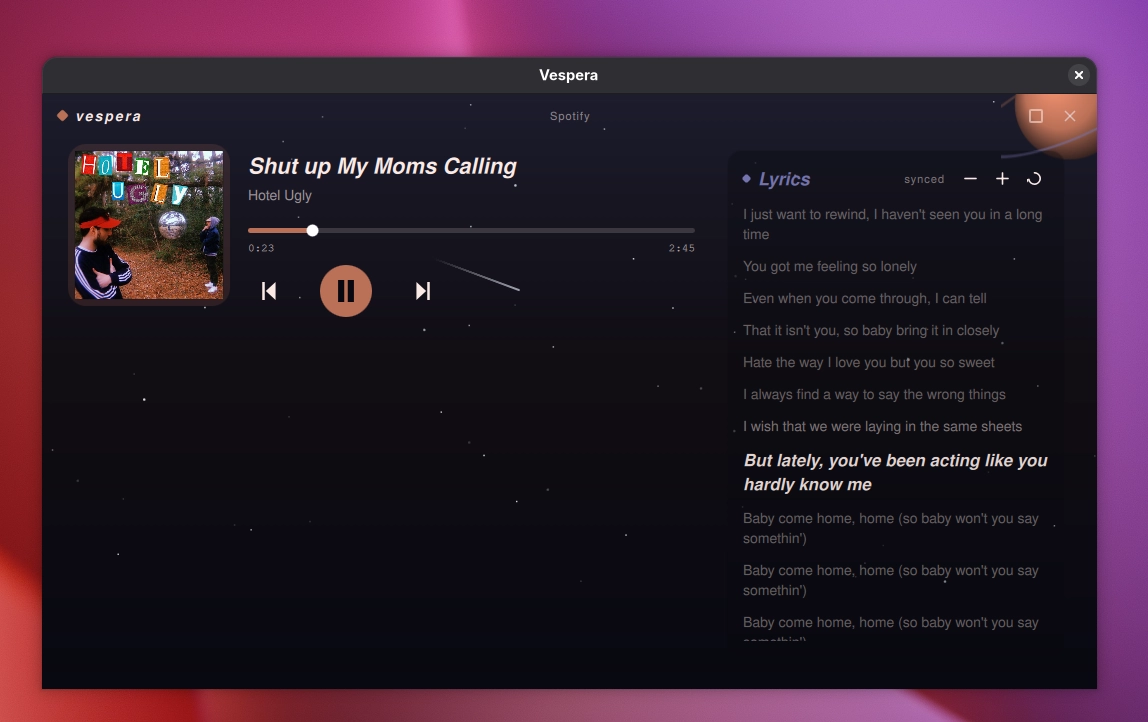
🎵 Vespera: Player-ul muzical pentru Linux cu versuri sincronizate și efecte vizuale dinamice!
Dacă ești în căutarea unei aplicații moderne și elegante pentru a-ți asculta muzica preferată pe Linux, Vespera aduce o experiență vizuală deosebită, combinând funcționalitățile audio avansate cu un design spectaculos.
✨ Principalele caracteristici Vespera:
🎤 Versuri sincronizate în timp real:
• Caută și afișează automat versurile melodiilor în stil karaoke, perfect sincronizate cu piesa care rulează.
🎨 Vizualizări și efecte dinamice:
• Interfața se adaptează cromatic în funcție de coperta albumului și oferă efecte vizuale fluide care reacționează la ritmul muzicii.
🎧 Suport audio extins și organizare:
• Suport pentru cele mai populare formate audio (MP3, FLAC, WAV, OGG, AAC).
• Organizare facilă a bibliotecii muzicale locale, listelor de redare și metadatelor (ID3 tags).
🖥️ Design nativ și modern:
• Construit special pentru mediile de desktop Linux (GTK4 / Libadwaita), oferind o integrare impecabilă cu modul Dark/Light al sistemului.
🔓 Complet gratuit și Open-Source:
• O aplicație rapidă, fără reclame și fără urmărire a datelor, dedicată pasionaților de muzică pe Linux.
O alegere excelentă pentru a reda viață colecției tale audio pe desktop! 🚀
#Vespera #Linux #OpenSource #MusicPlayer #GTK4 #Libadwaita #Audio #TechNews #DesktopLinux #SoftwareLibre
![[?]](https://files.mastodon.social/accounts/avatars/116/058/852/292/788/403/original/0aa647ba4d6ca114.png)
Shadowfetch Linux: нова дистрибуція з акцентом на AI #linux #technology #linuxnews #opensource #freeinternet - https://lin.in.ua/novyny/2026/07/shadowfetch-linux-%d0%bd%d0%be%d0%b2%d0%b0-%d0%b4%d0%b8%d1%81%d1%82%d1%80%d0%b8%d0%b1%d1%83%d1%86%d1%96%d1%8f-%d0%b7-%d0%b0%d0%ba%d1%86%d0%b5%d0%bd%d1%82%d0%be%d0%bc-%d0%bd%d0%b0-ai/
![[?]](https://files.mastodon.social/accounts/avatars/114/048/194/944/023/530/original/3a6b93b37c67427d.png)
The Fedora 45 Sausage Factory
https://supakeen.com/weblog/the-fedora-45-sausage-factory/
Comments: https://news.ycombinator.com/item?id=49046525
#HackerNews #Fedora45 #SausageFactory #OpenSource #Linux #Community #TechNews
![[?]](https://files.defcon.social/dcsocial-s3/accounts/avatars/109/597/663/767/801/251/original/a1f1a5fc48aaee45.png)
I hardened a systemd unit with RootDirectory= (chroot), PrivateTmp=true,
and NoExecPaths=/tmp. I thought this made /tmp non-executable.
systemd-analyze security also showed everything green.
Just to be sure, I copied a small test program into /tmp inside the unit
and tried to run it by hand. It ran — even though NoExecPaths=/tmp
should have blocked that.
The reason: a plain path in NoExecPaths= is relative to the host, not to
RootDirectory=, unless you add a "+" prefix. systemd.exec(5) does
document this, but it is easy to forget, and when you do, the mistake is
silent: /tmp still looks restricted, but is not. The fix is one
character: NoExecPaths=+/tmp.
systemd-analyze security cannot find this problem either. It only checks
if a directive is present in the config, not what it actually does at
runtime.
That is exactly why I built systemd-sandbox-check: so misconfigurations
like this do not go unnoticed. It starts a transient unit with the same
[Service] settings as your real unit and actually tests around 25
hardening directives at runtime — ProtectHome, PrivateDevices,
RestrictAddressFamilies, CapabilityBoundingSet, and more:
[FAIL] no_exec_paths (NoExecPaths): copy of interpreter outside
ExecPaths= EXECUTED -- allowlist not enforced
It is a single static binary, no dependencies, and exits non-zero on
FAIL, so it works as a CI check.
![[?]](https://files.mastodon.social/accounts/avatars/116/055/899/266/786/628/original/496f2eb52b969218.jpg)
Imagine a world where every small hobbyist or volunteer dev has to register with a global corporation just to share their work. That's the world Google is building for Android in 2027. https://keepandroidopen.org @keepandroidopen
![[?]](https://igeek.gamer-geek-news.com/fileserver/017Y3RGP0P99HT1KVS06P09Z0E/attachment/original/01KHCBXXJWZB9H1M3MNXEMPHDM.jpeg)
🐧 Wine 11.14 brings improvements for DirectSound, BCrypt, FreeBSD
The Wine 11.14 development release is officially out now bringing with it an assortment of new features to improve Windows apps / games on other platforms.Read the full article on GamingOnLinux.
📰 Source: GamingOnLinux Latest Articles
🔗 Link: https://www.gamingonlinux.com/2026/07/wine-11-14-brings-improvements-for-directsound-bcrypt-freebsd/
🐧 GE-Proton 11-3 brings better OptiScaler integration, AMD FSR4 improvements and lots of game fixes
GE-Proton 11-3 (and 11-2 just before) is a huge release for the popular compatibility layer for SteamOS / Linux.Read the full article on GamingOnLinux.
📰 Source: GamingOnLinux Latest Articles
🔗 Link: https://www.gamingonlinux.com/2026/07/ge-proton-11-3-brings-better-optiscaler-integration-amd-fsr4-improvements-and-lots-of-game-fixes/
![[?]](https://cdn.social.linux.pizza/system/accounts/avatars/109/132/900/180/602/528/original/a56dce0909c32974.jpg)



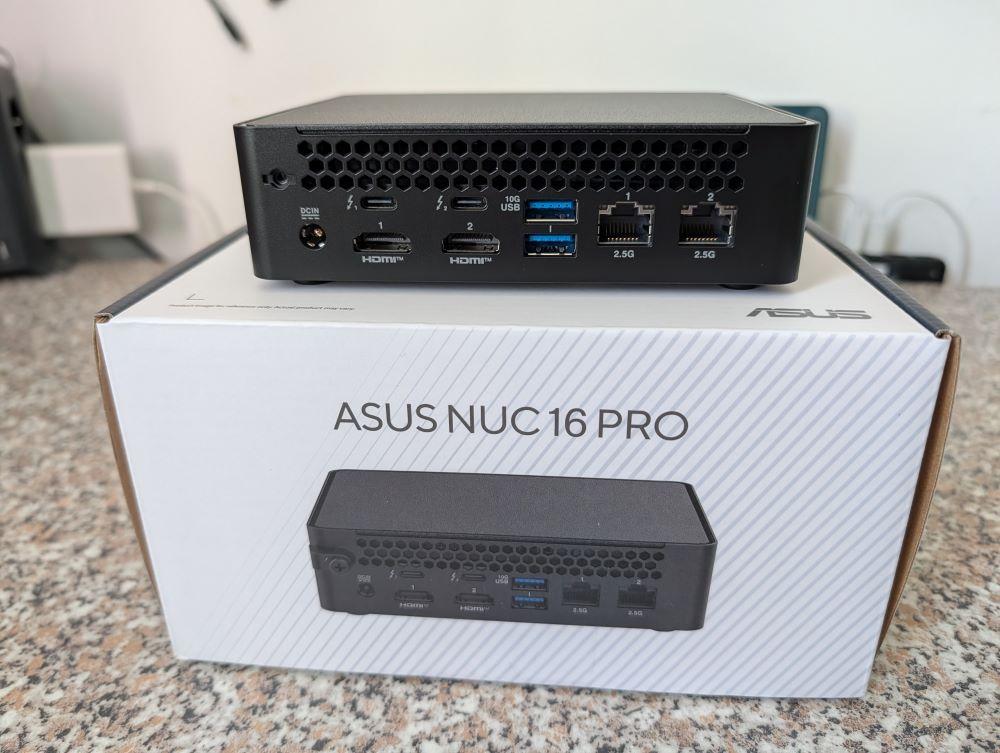
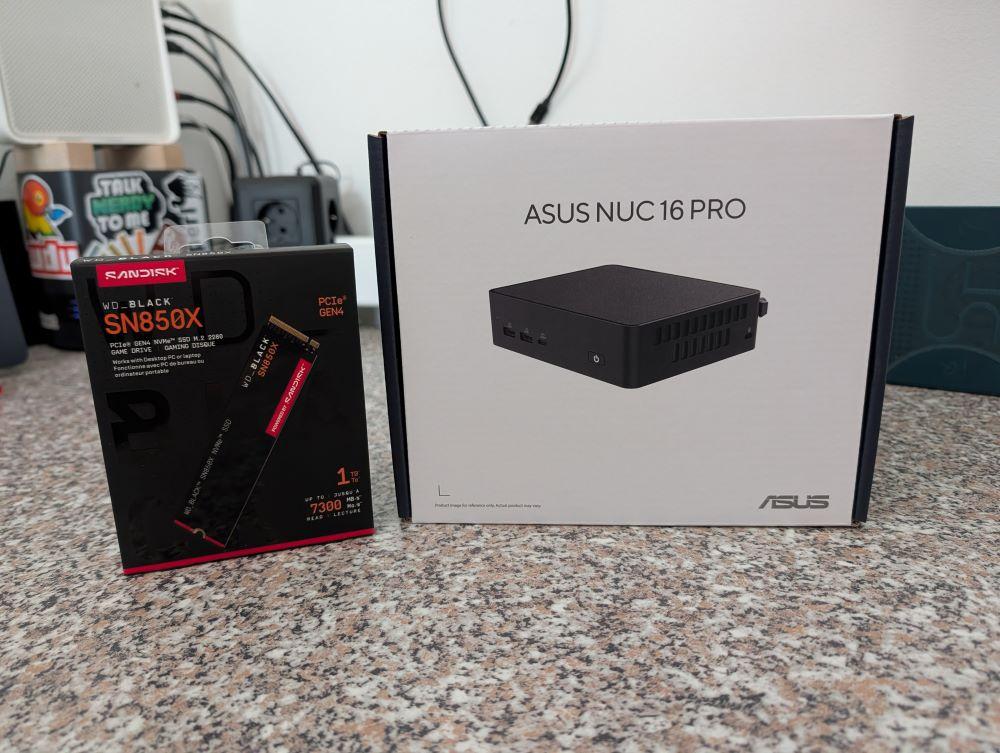
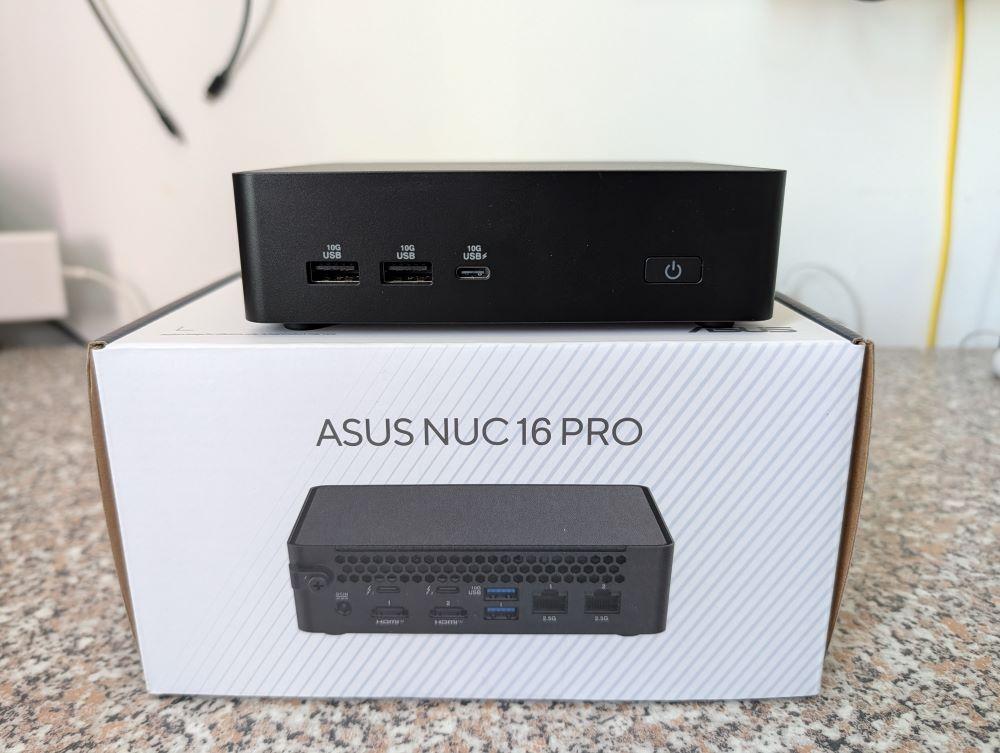
Change of plans: I didn’t end up waiting for the upcoming Minisforum MS-03 Workstation after all, but instead decided on the ASUS NUC16 PRO on a whim.
The reason was that Wendell from Level1Techs really praised this NUC in his latest video. He also highlighted the great Linux support from both Intel and ASUS. I’ve linked the video below.
And unlike many Chinese manufacturers, you can easily find all the drivers on their support pages (both Intel and ASUS)—including those for Linux! Plus, the download servers are fast, unlike with the Chinese manufacturers...
It has 32 GB of RAM, but unfortunately it’s soldered onto the motherboard on this model—though it does offer faster speeds.
I had to buy the NVMe drive separately; I opted for a 1 TB WD Black SN850X. Since I store everything on the NAS, I need virtually no storage space on the computer itself—just enough for the operating system; 256 GB would be more than enough. But a larger NVMe drive means more speed and a longer lifespan.
Other specs: Intel Core Ultra X7 358H, ASRock B390, 2x TB4, 2x 2.5-inch, 4x USB-A 10G, 1x USB-C 10G, 2x HDMI 2.1, Wi-Fi 7, Bluetooth 6, two M.2 Gen5/Gen4 slots. It’s a breeze!
So, let’s install Linux on it! (To be on the safe side and to ensure the best possible support, it’ll be Fedora again...)
Level1Techs Video:
https://youtu.be/ZDT6ts3cfSA
#linux #opensource #freesoftware #minipc #nuc16Pro #fedora #level1techs #asus #nuc #pantherlake #intel
![[?]](https://files.defcon.social/dcsocial-s3/accounts/avatars/116/884/063/826/161/498/original/ed55cfa48217af62.png)
Local LLMs on Raspberry Pi are shifting from novelty to practical privacy tool. Qwen3 running on a Pi 5 with 16GB RAM gives offline inference with zero data leakage - ideal for homelab automation scripts, local chatbots, or private code assistance. No cloud dependency, no API costs, fully offline. #Privacy #OpenSource #Linux #Homelab #SelfHosted #LocalAI
🐧 Valve begin improving account switching in the latest Steam Beta
Account switching is still not great on Steam but it seems Valve are aware and have started making some tweaks to make it a smoother experience.Read the full article on GamingOnLinux.
📰 Source: GamingOnLinux Latest Articles
🔗 Link: https://www.gamingonlinux.com/2026/07/valve-begin-improving-account-switching-in-the-latest-steam-beta/
🐧 GNOME Added Support Resizing / Moving Screenshot Selection via Keyboard
GNOME, the popular Linux Desktop, finally added keyboard navigation support for its built-in screenshot UI in the main branch. Meaning if everything goes well, the next Ubuntu 26.10, Fedora 45 Work...
📰 Source: UbuntuHandbook
🔗 Link: https://ubuntuhandbook.org/index.php/2026/07/gnome-added-support-resizing-moving-screenshot-selection-via-keyboard/