Search results for tag #wayland
![[?]](https://files.mastodon.social/accounts/avatars/000/010/947/original/34a579358b5060ee.png)
Wine 11.15 brings improvements for Wayland, more format conversions in WindowsCodecs https://www.gamingonlinux.com/2026/08/wine-11-15-brings-improvements-for-wayland-more-format-conversions-in-windowscodecs/
Wine 11.15 brings improvements for Wayland, more format conversions in WindowsCodecs
#Wine #Linux #OpenSource #Wayland
![[?]](https://files.mastodon.online/accounts/avatars/109/220/101/443/806/284/original/4f93f1d008c06d0c.jpg)
Now that I'm back from traveling for the time being, I decided to sit down and finish the Smithay upgrade in niri. Here's the result of 4 hours of streaming today: window moving and resizing, as well as the overview gestures, now work with a tablet, thanks to the new tablet tool grabs!
![[?]](https://mstdn.ro/system/accounts/avatars/110/856/221/081/804/323/original/47506f22e338867a.jpg)
🖥️ KDE Plasma 6.x: Performanță net superioară pentru Remote Desktop și sesiunea Wayland!Echipa de dezvoltare KDE continuă să aducă optimizări masive în mediul grafic Plasma, punând un accent deosebit pe îmbunătățirea experienței de lucru la distanță (Remote Desktop) și fluidizarea sesiunilor Wayland.✨ Principalele îmbunătățiri și noutăți:🚀 Performanță crescută pentru Remote Desktop:• Optimizări majore la nivelul backend-ului KPipeWire și al serverului afișajului, reducând latența transmisiunii video și latența de intrare (mouse/tastatură) în timpul sesiunilor de control la distanță (prin protocoale precum RDP sau VNC).⚡ Optimizări avansate pentru KWin (Wayland):• Reducerea consumului de resurse CPU și GPU la randarea cadrelor, eliminând micro-întârzierile (stuttering) pe configurațiile cu monitoare cu rată mare de împrospătare (high refresh rate) sau rezoluții 4K/8K.🎨 Ajustări de interfață și usabilitate:• Rafinări la nivelul widget-urilor de sistem, al panourilor și al managerului de sarcini (Task Manager), alături de un răspuns vizual mai rapid la comutarea temelor și a spațiilor de lucru virtuale.⚙️ Suport îmbunătățit pentru configurații Multi-Monitor:• Corecții pentru gestionarea scalării fracționale și poziționării ferestrelor la reconectarea monitoarelor externe sau la trezirea sistemului din starea de suspendare.Un pas important înainte pentru utilizatorii de Linux care se bazează pe KDE Plasma pentru fluxuri de lucru profesionale sau administrare de la distanță! 🚀#KDE #Plasma6 #Linux #Wayland #RemoteDesktop #KWin #OpenSource #TechNews #Linuxiac #FOSS

![[?]](https://media.bsd.network/accounts/avatars/109/207/430/504/108/566/original/b37198ec33972825.png)
It's now possible to define icons in menus.
There's two configurable options:
menu-style icon.path ~/.config/cow/icons:/usr/local/share/icons
This tells CoW where to look for icons.
menu-style icon.size 16
This sets the size.
In practice, it's therefore possible to, say:
menu-add -I foo.png "Foo"
Screenshot attached,
Thanks to @justine for all her hard work in testing this, and coming up with the proposal in the first place.

![[?]](https://media.mstdn.social/accounts/avatars/108/986/453/754/873/704/original/ca67cb2b85161018.jpeg)
I love #gnome, its #libadwaita app ecosystem. But I also love #scrolling #tiling à la #niri. For now, #paperwm works well, but I wonder what the future of window management in GNOME will look like. 🤔
Mosaic isn't going to cut it for me. 🫣
![[?]](https://cdn.masto.host/mastodonuno/accounts/avatars/114/654/878/489/960/450/original/541376d5adf76896.png)
Void Files punta tutto su velocità, semplicità e un design moderno per Wayland e Niri. Ecco cosa offre questo nuovo file manager. #Linux #Wayland #Niri #ArchLinux #OpenSource https://www.linuxeasy.org/void-files-il-file-manager-minimale-che-punta-su-velocita-e-design-per-wayland/
![[?]](https://files.mastodon.social/accounts/avatars/117/052/762/668/300/764/original/e6a8101af579d64c.png)
UrsaOS v0.1.0-beta.2 is here. 🐻
UrsaOS around a simple idea: Arch Linux should remain transparent and powerful while offering a complete, thoughtfully configured desktop from the first boot.
UrsaOS combines Niri, Dank Material Shell, Btrfs, Calamares, offline installation and its own signed package repository in one focused Wayland system.
This is a public beta, not a production-ready release.
#UrsaOS #Linux #ArchLinux #Wayland
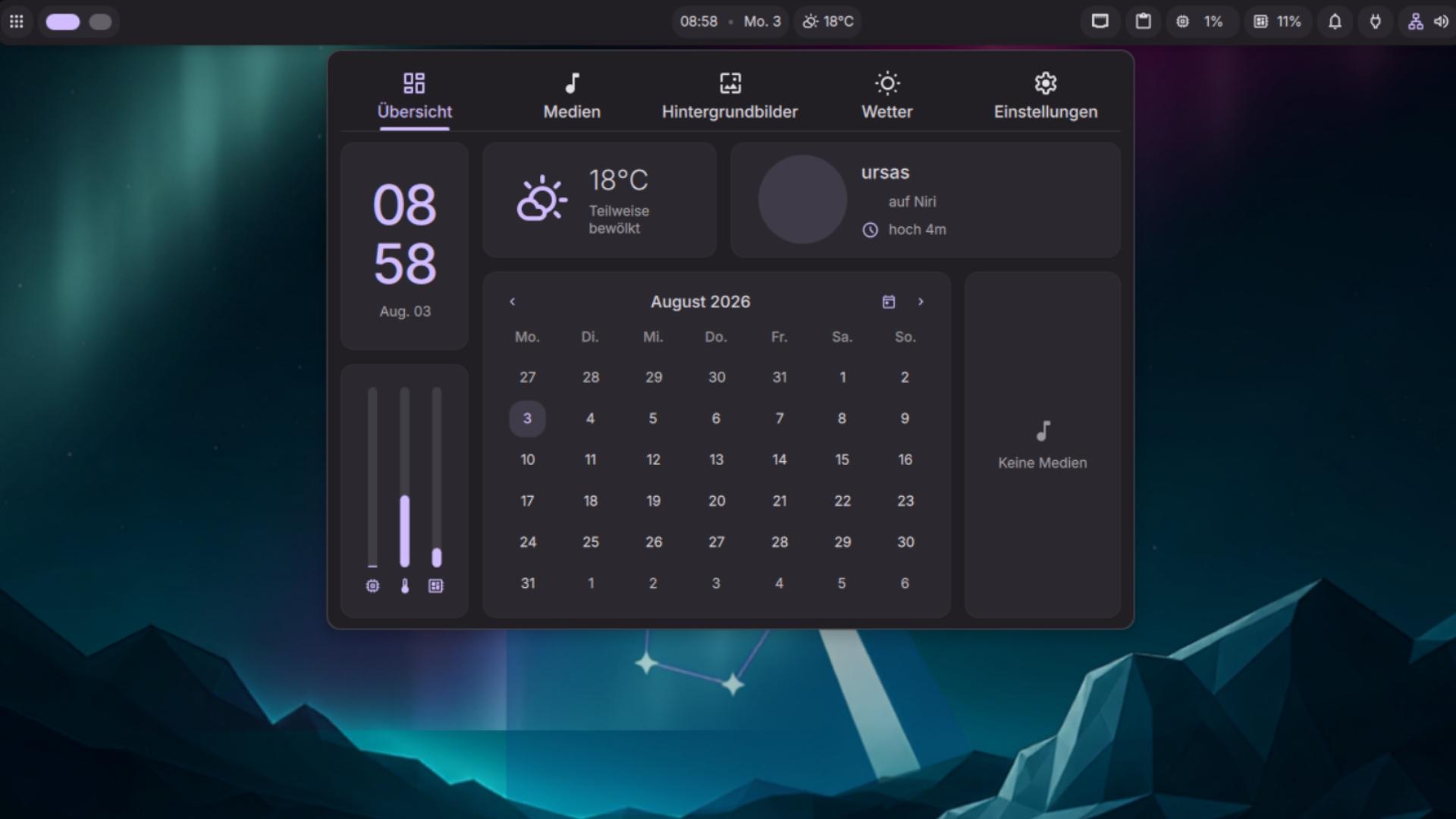
Alt...
Dank Material Shell Control Center — Quick access to calendar, audio, weather and settings.
![[?]](https://cyberpunklol.files.fedi.monster/accounts/avatars/117/024/347/319/605/995/original/cc6c4d011463faf5.png)
So far, the Pnictogen Wing and its erstwhile technical advisor on computer matters @alyx_woodward, who isn't really into computers nearly as much as older-fashioned stuff (like me and Frisk and others) but feels like she's got to learn this crap same as the rest of us, have managed to get #Wayland working on our hand-me-down NVidia-burdened system in exactly one set of circumstances: it works on CachyOS #Linux if we use #KDE and nothing else gives more than a blank screen and a mouse cursor (that can move.) Wayland modes on Xfce and LXQt do not work. Wayfare and other lesser-used compositors do not work. So far we haven't the faintest idea why.
Wayland has never worked on any #BSD installation we've yet tried and it's touch and go as to whether we can get Nvidia support working. Steps which seem sufficient for one variant of FreeBSD don't work on others. It'd be easier to ditch the Nvidia card but we have no money and it's a terrible time to shop for any computer parts. I would like to make do with what we have, which ought to be more than sufficient for our conceivable needs.
~Chara of Pnictogen
Some tips I've learned from writing #cow...
1. Nested River (on #wayland/#x11) is your friend. This makes it very easy to run a nested WM instance on whatever one is using to test features. The inner-WM will need separate bindings from the "host" because that takes priority.
2. Remotely with wayvnc. Because #river is built on wlroots, #wayvnc is a great alternative if you want to do remote testing/development.
3. As with point 2., you can set the environment variable WL_HEADLESS_OUTPUTS=n, where "n" represents number of screens. This can be used with some VNC clients to allow "multi-monitor" support. This can be made even better with #wayvnc version 0.10 as this can render multiple outputs appropriately.
I'm sure there's more, but this is a practical start to some of the things I've been using with #cow.
GNOME 50.4 è disponibile con numerose correzioni per Shell, Mutter e GDM, oltre a miglioramenti per Maps e GVFS. Un aggiornamento consigliato per tutti gli utenti. #GNOME #Linux #OpenSource #Desktop #Wayland https://www.linuxeasy.org/gnome-50-4-migliora-prestazioni-sicurezza-e-stabilita-del-desktop-linux/
![[?]](https://snac.smithies.me.uk/justine/s/avatar-270304302821a87b50026a5768a00c56.png)

Alt...
A screenshot of my Cow ( FVWM for Wayland ) desktop that runs on the River compositor. The wallpaper shows a green meadow with flowers and a girl lying down staring at the sky. In the background are snow peaked mountains. There is a terminal window open with the Cow menus open and a qutebrowser window that is shaded.
Context bindings.
It's now possible in #cow to bind mouse actions to different parts of a window border -- all four sides, and all four corners. Additionally, one can now bind actions to icons and the root window.
For example:
```
mouse I:0+right "menu-show WindowOps"
```
Pops up a menu to perform window operations, when the right mouse button is pressed on an icon. Actions defined in that menu will run in context of the non-iconified window (as opposed to the icon itself).
Key bindings are supported, too, but they can only be bound to titlebar buttons.
This is similar to what #fvwm used to allow.
Cc: @stuartl
CoW, is a window manager on top of the River compositor.
![[?]](https://cdn.masto.host/pinsapocc/accounts/avatars/115/747/381/819/876/174/original/9258b803e2ffdd24.png)
Currently trying out the Cosmic desktop interface and I must say its pretty awesome so far. Doesn't get in your way, tiling works really well, and there's customization where you want it.
I miss the lightweight simplicity of LXDE, but the X.Org vs experimental Wayland debacle is just too much for me right now...
If I need to stick with Gnome, I'll at least try out Cosmic for a while
#de #cosmic #wayland #x11 #xorg
![[?]](https://cdn.masto.host/mastodonuno/accounts/avatars/000/087/313/original/975dfa631bee18a6.png)
🖥️ GNOME (versiuni de mentenanță / actualizări de securitate): Corecții critice pentru GDM și gestionare îmbunătățită a monitoarelor!
Actualizările punctuale (point releases) din seria GNOME aduc îmbunătățiri majore pe partea de securitate la nivelul managerului de autentificare (GDM), rezolvând totodată probleme legate de scalarea monitoarelor și gestionarea sesiunilor grafice pe Wayland și X11.
✨ Noutăți și îmbunătățiri principale:
🔒 Corecții de securitate în GDM (GNOME Display Manager):
• Rezolvă vulnerabilități legate de gestionarea sesiunilor de utilizator și autentificare, prevenind posibile escaladări de privilegii sau blocaje la comutarea între conturi.
🖥️ Gestionare mai bună a afișajului și monitoarelor (Mutter / GNOME Shell):
• Optimizări pentru configurațiile multi-monitor: remedierea artefactelor vizuale, stabilizarea ratei de împrospătare (refresh rate) și gestionarea mai precisă a scalării fracționare (fractional scaling).
⚡ Stabilitate crescută pe Wayland:
• Corecții de cod pentru prevenirea crash-urilor neașteptate ale managerului de ferestre Mutter în timpul schimbării rezoluției sau la conectarea/deconectarea monitoarelor externe (e.g. prin HDMI/DisplayPort sau dock-uri USB-C).
⚙️ Ajustări în GNOME Settings & Control Center:
• Rafinări la nivelul panoului de setări ale sistemului pentru o configurare mai fluidă a rețelei, Bluetooth-ului și economisirii de energie.
O actualizare recomandată tuturor utilizatorilor de distribuții bazate pe GNOME (Ubuntu, Fedora, Arch Linux) pentru a menține sistemul sigur și stabil! 🚀
#GNOME #Linux #OpenSource #GDM #Wayland #LinuxDesktop #CyberSecurity #TechNews #FOSS

🖥️ Hyprland 0.56.2: Corecții pentru modul fullscreen, partajarea ecranului și stabilitate pe Wayland!Noua versiune de mentenanță Hyprland 0.56.2 aduce un pachet consistent de 17 reparații backported axate pe comportamentul ferestrelor în ecran complet, partajarea ecranului, randarea grafică și gestionarea monitoarelor.✨ Principalele îmbunătățiri din versiunea 0.56.2: 📺 Corecții pentru modul Fullscreen:• Reintroduce comportamentul anterior pentru ferestrele fullscreen în layout-ul de tip scrolling.• Previne blocarea ferestrelor în colțul stânga-sus la ieșirea din modul ecran complet și îmbunătățește navigarea când un fullscreen gestionat de layout este activ.• Corectează ordinea de randare (z-index) pentru ferestrele plutitoare (floating) atunci când una dintre ele este în fullscreen.🎥 Partajare de ecran îmbunătățită (Screen Sharing):• Rezolvă problema cursorului invizibil: la capturarea unei singure ferestre (top-level window), cursorul software este acum inclus corect pe fluxul video partajat. ⚙️ Scara afișajului și regulile de ferestre:• Utilitarul hyprctl nu mai rotunjește sau trunchiază valorile fracționare de scalare a monitoarelor.• Regula gaps_out nu mai suprascrie eronat setarea separată float_gaps.
• Verificare suplimentară pentru configurațiile de oglindire (mirror) ale monitoarelor. 🎨 Randare și interfață (OpenGL & Input):• Activare implicită a randării FP16 pe hardware-ul compatibil.• Backend-ul OpenGL invalidează corect buffer-ul de adâncime (depth buffer) pentru a evita artefactele vizuale.• Ferestrele metodelor de introducere text (IME) apar acum deasupra tuturor elementelor de pe desktop.• Previne crash-urile cauzate de valori duplicate în fișierele de configurare. Un patch release extrem de util pentru utilizatorii de Hyprland care căutau o experiență mai fluidă și fără bug-uri de randare pe Wayland! 🚀#Hyprland #Wayland #Linux #OpenSource #LinuxDesktop #Hyprland056 #TechNews #FOSS
![[?]](https://files.mastodon.social/accounts/avatars/116/345/235/803/749/403/original/96245b67183cdbb5.jpeg)
Learn Hyprland the Easy Way
https://www.linuxteck.com/learn-hyprland-the-easy-way/
Want to start using Hyprland but don't know where to begin?
This practical guide walks through installation, configuration, keybindings, Lua support, and screen sharing so you can build your first productive Wayland desktop with confidence.
#linuxteck #Hyprland #Wayland #Linux #OpenSource #ArchLinux #Ubuntu
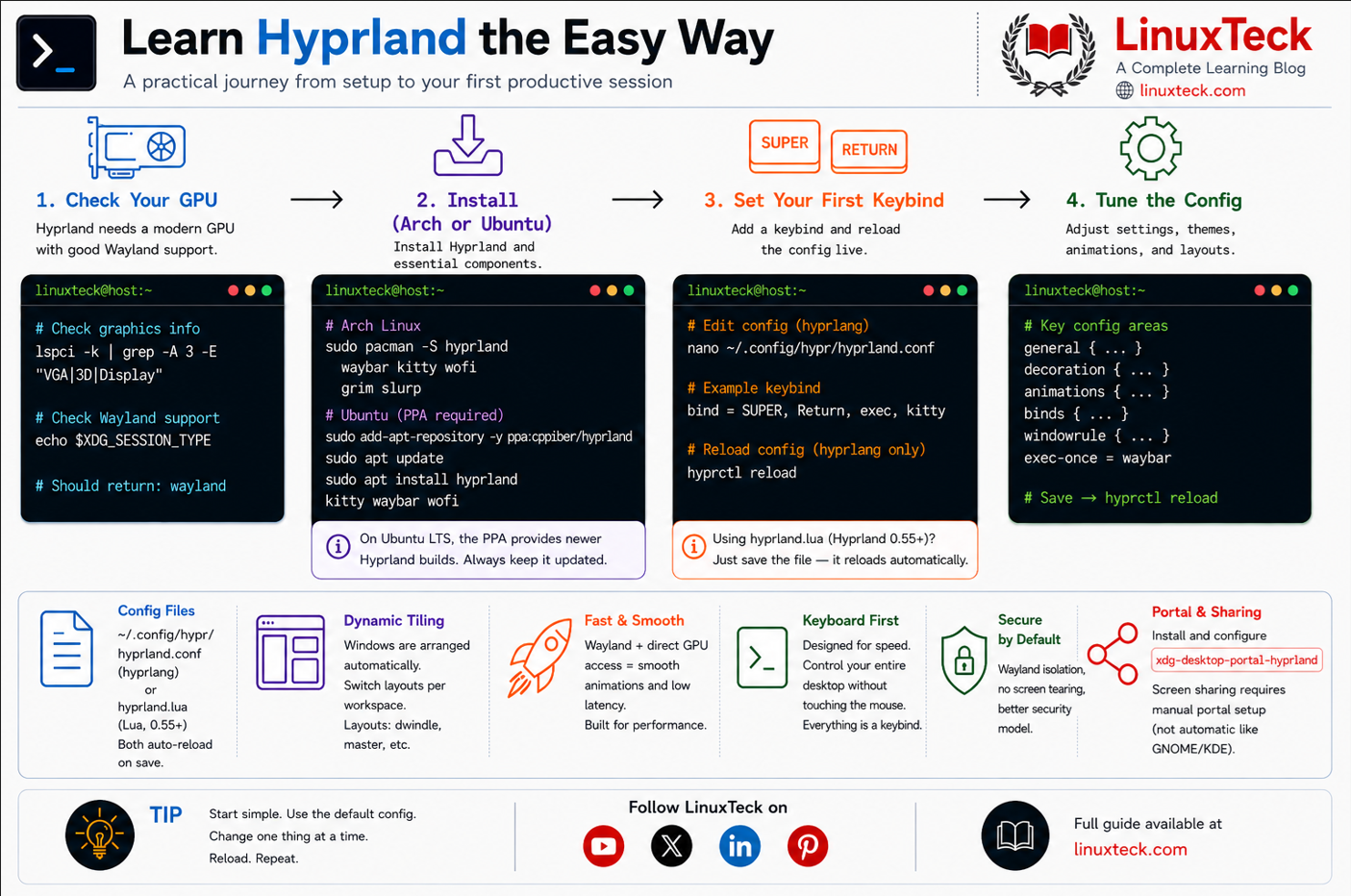
Alt...
Learn Hyprland the Easy Way
I'm still playing around with this, but I suspect I'll merge it later.
You can now style menus individually via the `menu-style` command.
See screenshot attached.
CoW is a stacking window manager running on top of River:
https://codeberg.org/thomasadam/cow

@stuartl Hi Stuart. Re point 2., I now have an open PR which implements a PR for a `window-list` command.
See the `ta/window-list` branch. It can be filtered and sorted, and there's also a -F for filtering, too.
There's also typeahead.
It was a lot of fun to implement -- I might tweak it in the future, bit how it works now is how I intend it to work.
Let me know how you get on.
@stuartl Hi, Stuart.
I'm slowly working my way through this list, as I think it's valuable.
In terms of your first point about moving/resizing windows to fit the different dimensions of your screen, see:
https://codeberg.org/thomasadam/cow/pulls/204
I think this is what you were after. You can checkout the `ta/vp-geometry` branch. Note the examples in the PR description as well.
I'm also working on the windowlist menu. I had hoped to defer this to external applications, but a lot of that depends on which wayland protocol is used to enumerate that information. So having it builtin is probably the better option for simple tasks.
@stuartl re point 3 -- I do not know if Wayland has anything akin to xdd-menus. I don't think it does. I think the preferred way is to use `rofi` or one of the many typeahead applications to launch what you want. We might be back to the days of defining your own menus!
Currently, there is no way in CoW to PipeRead menus, or indeed anything like the DynamicMenu command. This is deliberate as it adds a lot of complexity and overhead I'm not sure I want to support. I will if the demand is there though. That said, there's nothing stopping you creating menus via `moocow`.
![[?]](https://polymaths.social/fileserver/01HCMX6M1CZNEVJ4F5H58TT5XJ/attachment/original/01JHC5KM5K0V0J0436SPD3F86H.jpeg)


 🍵
🍵  [
[Wayland, GNOME, KDE Plasma, COSMIC, XFCE, and LXQt are shaping the Linux desktop experience in 2026.
https://www.linuxteck.com/linux-desktop-trends/
This guide explains the biggest desktop trends, who they're for, and how to verify them using real Linux commands.
#Linux #LinuxDesktop #Wayland #GNOME #KDE #LinuxTeck
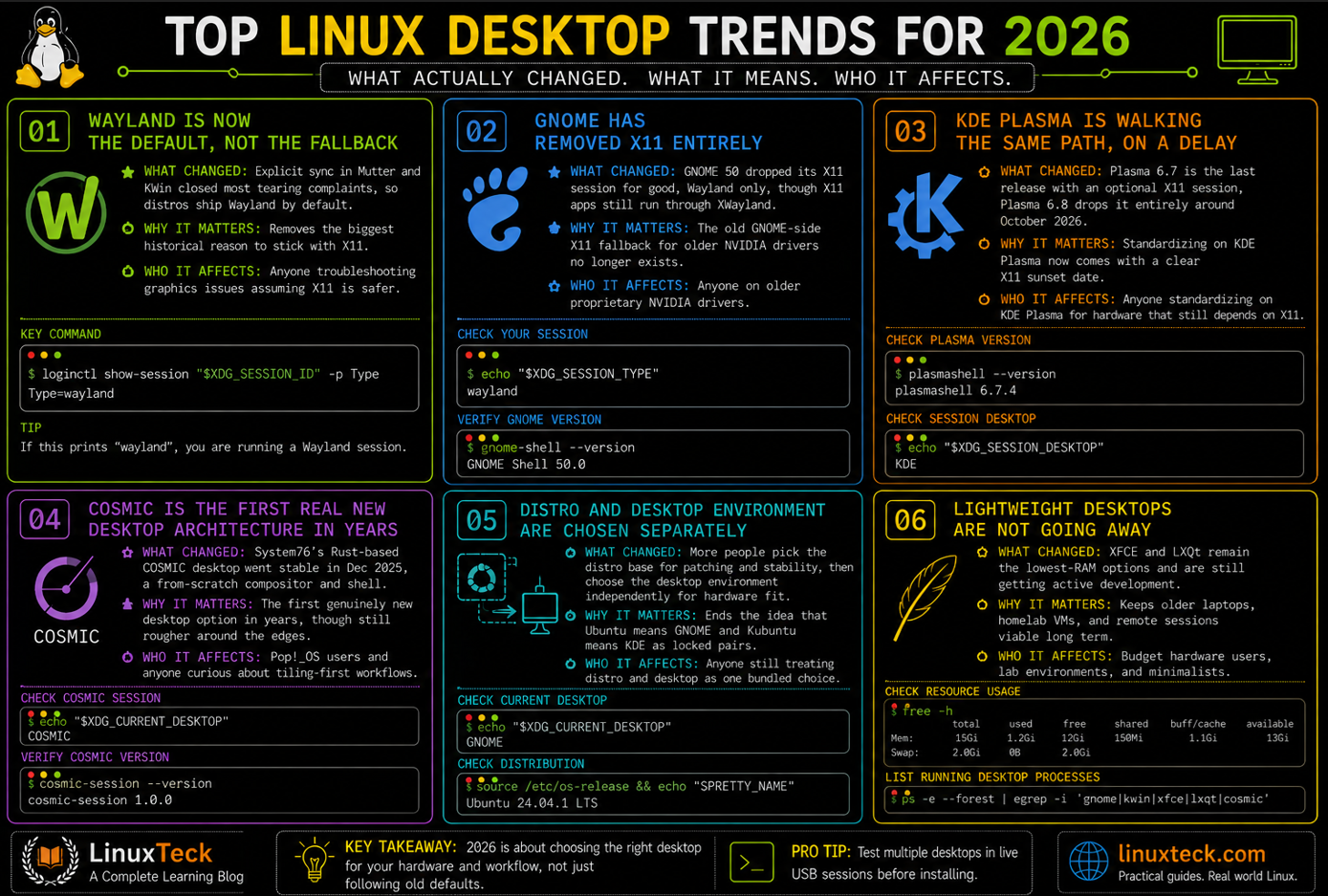
Alt...
Top Linux Desktop Trends for 2026
Today I will be attempting to revert back to XFCE on Fedora. I've been running Gnome for some time now due to Wayland allowing me to make use of the touch screen on my T480, but I hardly use it and I miss something more lightweight.
To ensure the safe-ification of this exercise, I created my own little guide
#xfce #fedora #gnome #wayland #X11
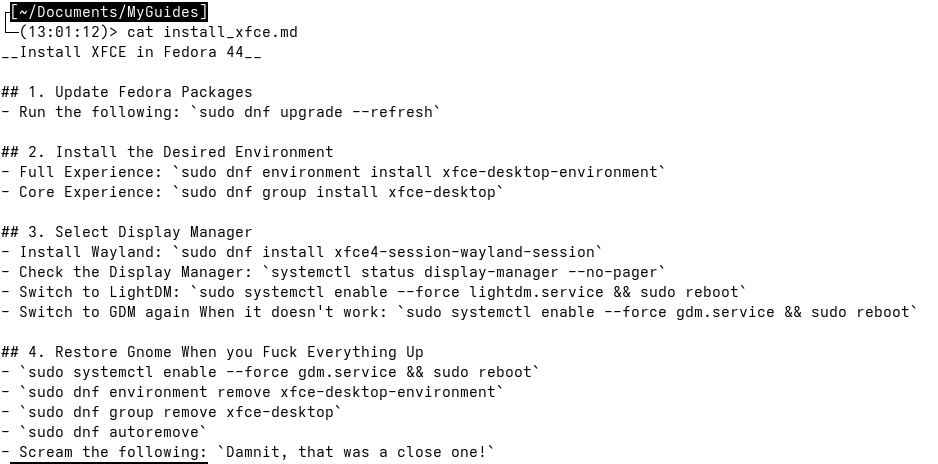
Alt...
A markdown document detailing a list of steps to take to install XFCE alongside Gnome in Fedora. The steps detail emergency actions to take when I inevitable mess things up on my system
![[?]](https://mastodon.longlandclan.id.au/system/accounts/avatars/109/573/513/395/599/946/original/d9f62920e1e1edbb.jpg)
Mucking around with #CoW this afternoon to slowly migrate my #FVWM set-up.
It's showing some great promise. The new menu features are letting me do most things I could do in FVWM. I need to figure out a few things, but I might be able to jump ship to #Wayland some day. Some of these things relate to CoW and others are more general of Wayland.
1. I do use FVWM as a manual tiling window manager quite a lot, and have shortcuts that split the desktop area in halves or quarters, with windows being placed on one half or one quarter of the screen. FVWM gives me a lot more freedom than a dedicated tiling WM like Awesome (which I tried for a while).
For this to work, I've got to figure out how to window-resize a window to half the viewport area; using CSS parlance for example to split the screen vertically and put a window on the left half; I move it to 0vw,0vh and resize to 50vw,100vh. Bottom-right I have to move to 50vw,50vh and resize to 50vw,50vh.
Haven't figured out how to do that yet, I need to compute the 50% somehow, and also account for frame borders. Might be doable with a script that calls `moocow` but I'll have to investigate.
2. Bringing up a window list temporarily like the old FVWM `WindowList Root c c`; so I can just choose a number for the window of interest and it closes the menu and switches. Right now I'm using `cowiconman`, but that's not quite there. Again, maybe some external tool is the answer.
3. Enumerating the XDG menu tree, or spawning a launcher that can do that (most seem to emulate the "run" box in Windows with some auto-complete smarts… never did find one that worked the way I'd like) — need to see if maybe I can pipe commands in like FVWM's `PipeRead` to integrate `fvwm-menu-desktop`.
4. (for my tablet) Decent on-screen keyboard *with* all standard keyboard keys… the set up I use now is Onboard (which is X11 only) with the IBM Model M theme and a 6 row layout including arrows, CTRL/ALT/shift and function keys.
5. Need to find a good replacement for XScreensaver. Maybe something that can work with an on-screen keyboard too.
https://codeberg.org/thomasadam/cow/commit/5f79061eb9f90aad2980cbcbd8daf130af481e84
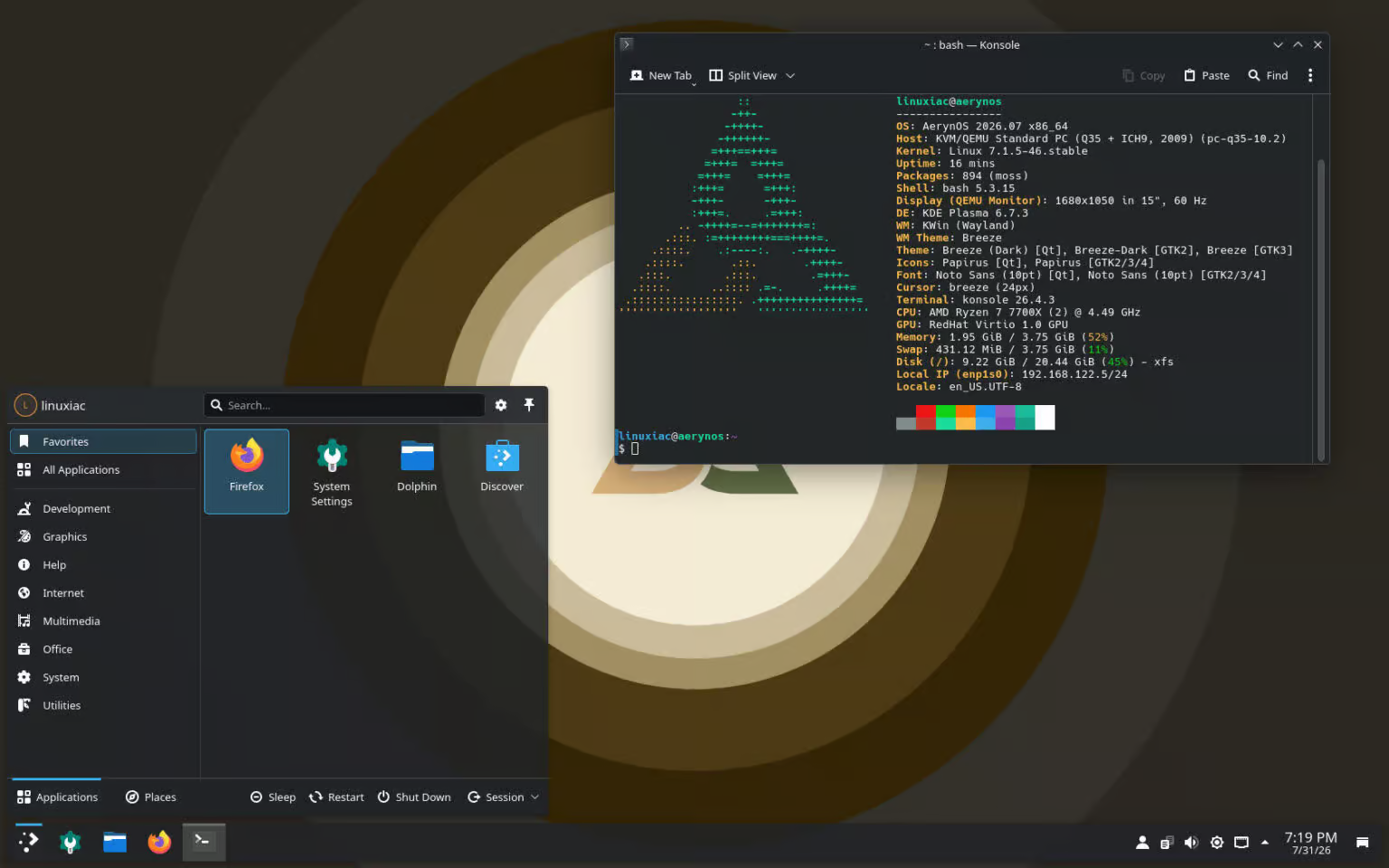
🚀 AerynOS primește actualizări masive: Linux Kernel 7.1.5, COSMIC 1.5 și Mesa 26.1.6! Distribuția independentă AerynOS a lansat un nou val important de actualizări în canalul său unstable, aducând cele mai recente tehnologii open-source pentru dezvoltatori și entuziaști. ✨ Ce aduce nou această actualizare:🐧 Actualizări de Kernel:• Pachetele de kernel stable și gaming au trecut la Linux 7.1.5, în timp ce varianta LTS (Long Term Support) a fost actualizată la versiunea 6.18.40. 🎨 Mediul de lucru COSMIC Desktop 1.5.0:• Noua versiune COSMIC vine însoțită de pachetul cosmic-sound-theme, oferind desktop-ului o identitate audio proprie.• Au fost adăugate elemente vizuale din KDE Oxygen (pictograme, teme sonore, decoratori de ferestre) și o stivă extinsă de metode de introducere Fcitx5. 🎮 Stivă grafică și componente de sistem:• Modulul grafic a primit Mesa 26.1.6 și Vulkan 1.4.357, alături de actualizări critice de sistem precum systemd 260.4 și NetworkManager 1.58. 🛠️ Noutăți pentru gaming și dezvoltare:• Include Wine 11.14, MangoWM 0.15.5, Noctalia 5.0 beta 6 Wayland shell, Firefox/Thunderbird 153.0.1, alături de un set modernizat de instrumente (Node.js, TypeScript 6.0, PHP 8.5). O distribuție aflată într-o evoluție rapidă, perfectă pentru cei care vor să testeze cele mai noi pachete pe Linux! 🚀 #AerynOS #Linux #COSMICDE #Mesa3D #OpenSource #LinuxGaming #Wayland #TechNews #SoftwareLibre #LinuxDistro
![[?]](https://s3.fedibird.com/accounts/avatars/109/249/893/853/390/750/original/8f924934aa4bf916.jpg)

![[?]](https://cdn.masto.host/floss/accounts/avatars/000/143/204/original/94403efd0b47ed2b.jpg)
Arch Linux-Based Archcraft 26.08 Brings New Sway #Wayland Session, #Linux Kernel 7.1, and Much More https://9to5linux.com/arch-linux-based-archcraft-26-08-brings-new-sway-wayland-session-linux-7-1
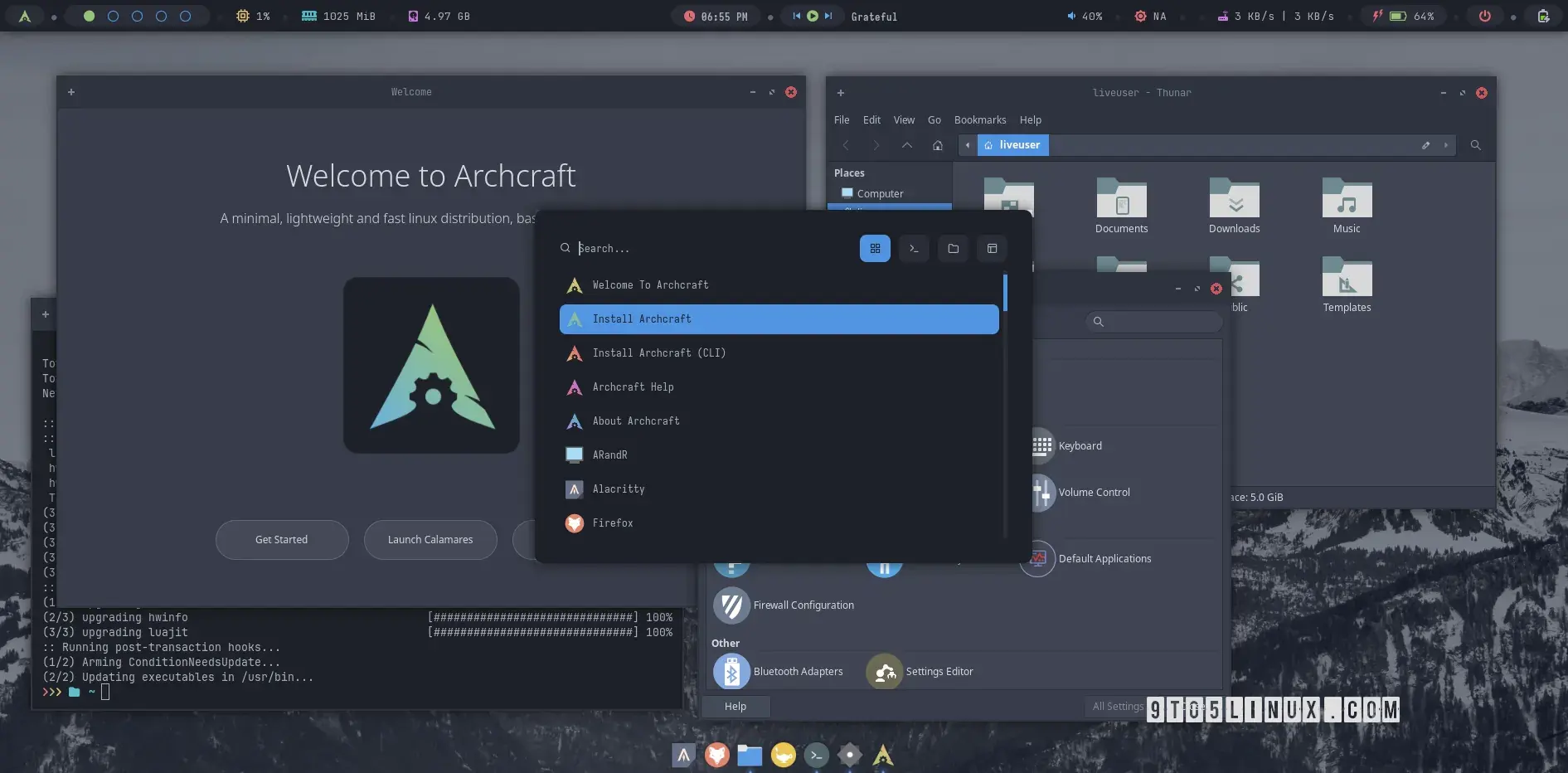
Alt...
A screenshot of Archcraft 26.08 with the Openbox and Bspwm setup showing the new Welcoem app, Xfce Terminal, Thunar file manager, and the Settings app.
Hi all -- I've added a slew of bug-fixes to CoW recently (thanks to @justine and others for the reports/testing!)
Additionally, I've added the following:
draw-exec -- a new command to draw a rectangle with the mouse to open a window at that size.
For example, the following binding (holding down meta (alt) and holding and dragging with the left mouse button) would open xterm once you've drawn a rectangle:
moocow 'mouse M+left draw-exec exec xterm'
If you'd like something more visual, see: https://youtu.be/8PkUKZDa6bQ
I'm not sure how useful this is, but it's fun, and was fun to implement it.
For the benefit of @stib, CoW is a wayland window manager for Linux/Unix running on the River compositor: